

What’s New in Appbot: The Biggest Updates from the First Half of 2026
Published 30th July, 2026 by Claire McGregor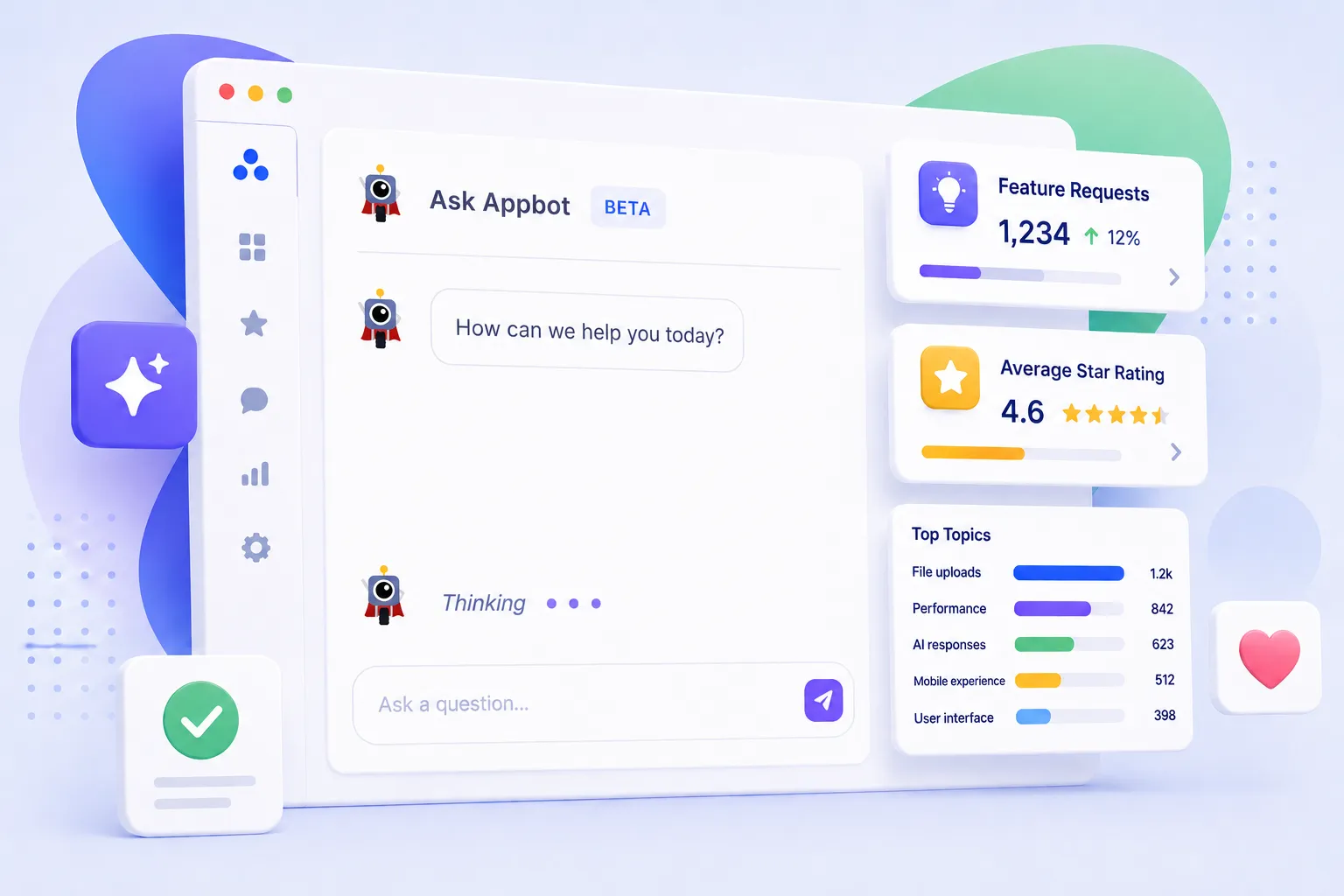
AI is changing how app teams work with customer feedback. Instead of manually filtering dashboards or reading thousands of app reviews, product, customer success, and support teams increasingly expect to ask questions in plain English, automate repetitive tasks, and uncover insights instantly.
That's exactly what we've focused on during the first half of 2026.
Over the past six months, we've introduced major improvements across AI-powered review analysis, Appbot MCP, and Auto Replies, making it faster and easier to understand customer feedback, respond to app reviews, and integrate Appbot into the AI tools your team already uses.
Here's everything that's new.
In this overview we'll be covering:
- Understand App Feedback Faster with Ask Appbot
- See What Specialised App Review Analysis Looks Like
- Bring Appbot into Your AI Workflow with Appbot MCP
- Reply to App Reviews Faster with Smarter Auto Replies
- The Future of AI-Powered App Review Analysis
- Experience the Latest Appbot AI Features
- Explore the New Features

Want to level up your app store review analysis?
Try Appbot free now, no credit card needed →TL;DR
We've been busy shipping updates to help app teams understand customer feedback faster, respond to reviews more efficiently, and improve their apps with less manual work. Here's what's new.
- Ask Appbotlets you analyse app reviews using natural language. It combines Appbot's specialised app rating and review analysis with AI to deliver deeper insights.
- Appbot MCPconnects your Appbot data to chosen AI workflow such as Claude or ChatGPT.
- Auto Replies now support custom AI prompts, more than 200 languages, and easier rule management.
App ratings and reviews have never been more important to an app's success.
Every review is an opportunity to understand what users love, identify bugs, uncover feature requests, and make better product decisions. Every reply is an opportunity to show existing and prospective customers that you're listening, responsive, and committed to improving your app.
At the same time, AI is fundamentally changing how teams expect to analyse and act on customer feedback.
Instead of manually searching dashboards or reading thousands of reviews, teams increasingly expect to ask questions in plain English, automate repetitive tasks, and surface insights instantly.
That's exactly what we've focused on over the first half of 2026.
Over the past six months, we've released a series of updates designed to help you understand customer feedback faster, respond to app reviews more efficiently, and bring Appbot into the AI tools you already use.
Understand App Feedback Faster with Ask Appbot
The biggest addition to Appbot this year is Ask Appbot, our new AI-powered assistant for analysing customer feedback.

Instead of manually filtering dashboards or searching through thousands of reviews, you can simply ask questions in plain English.
For example:
- What bugs are customers reporting after version 8.4?
- Which feature requests have increased recently?
- Summarise negative app reviews from Germany.
- Compare customer sentiment on iOS and Android.
- What are the top five use cases for Japan?
- Summarise reviews with mixed sentiment.
Large language models are incredibly good at understanding and generating language, but app review analysis requires much more than simply reading review text.
Over the past decade, Appbot has developed specialised intelligence for analysing app ratings and reviews, including:
- Sentiment analysis
- Topics
- Custom Topics
- Emotions
- Keywords
- Ratings
- Review metadata
Ask Appbot combines the reasoning capabilities of modern AI models with Appbot's specialised app review intelligence. Rather than relying only on raw review text, it uses structured insights purpose-built for understanding customer feedback at scale.
The result is more consistent, more relevant, and more actionable answers that help your team spend less time analysing reviews and more time improving your app.
Whether you're preparing for sprint planning, prioritising bugs, or identifying opportunities for your next release, Ask Appbot helps you move from customer feedback to actionable insights in seconds.
See What Specialised App Review Analysis Looks Like
We recently analysed more than 15,550 Claude app reviews in just minutes, demonstrating how Appbot's specialised app review intelligence uncovers patterns that aren't obvious from star ratings or individual reviews alone.
The result was deeper, more actionable insights delivered in a fraction of the time it would take to analyse reviews manually.
Read: Claude Fable 5: What 15,514 App Reviews Revealed That App Ratings Couldn't
Bring Appbot into Your AI Workflow with Appbot MCP
Whether you use ChatGPT, Claude, or another MCP-compatible AI assistant, you no longer need to switch between tools to analyse customer feedback.
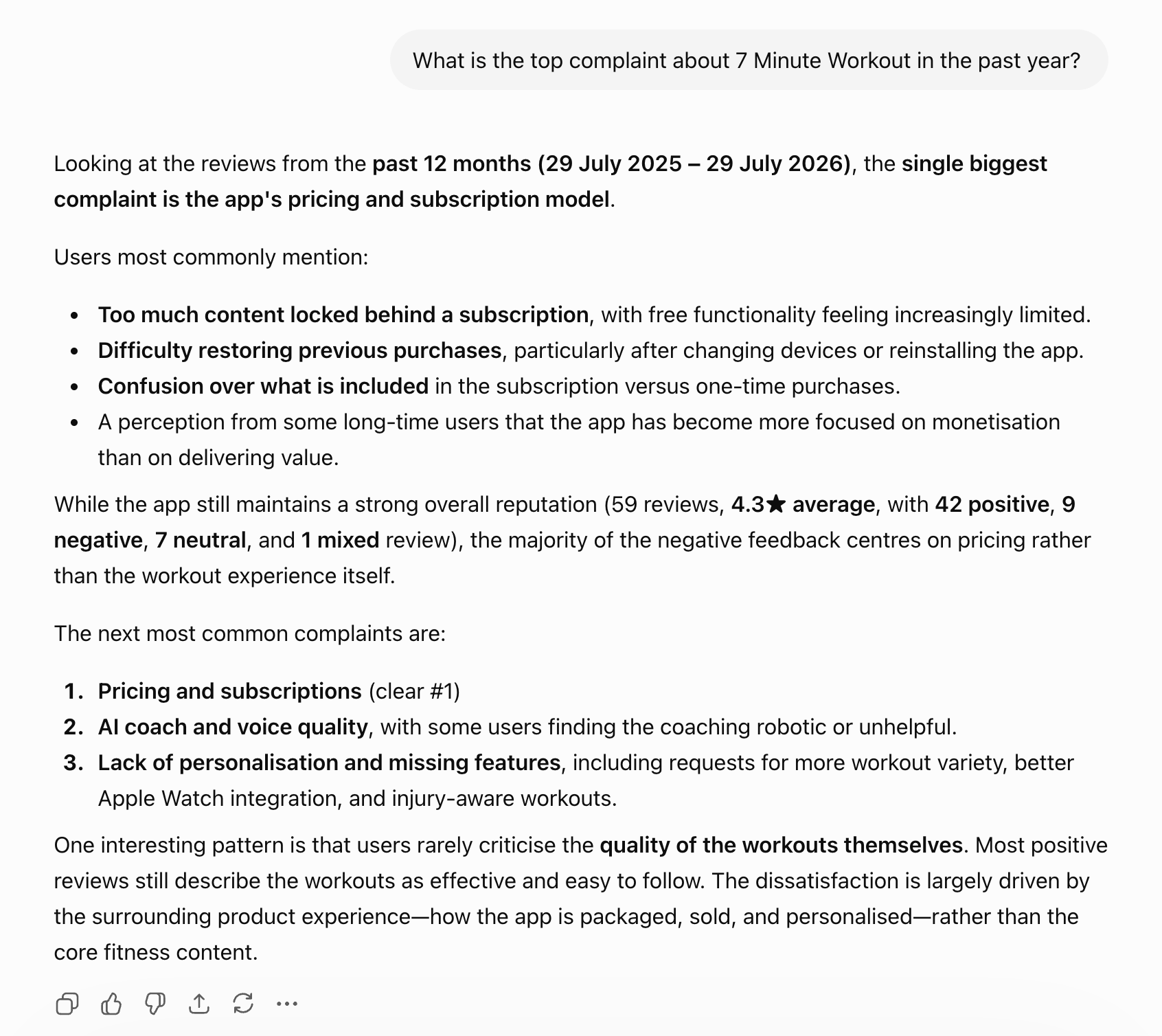
The Appbot MCP securely connects your Appbot account to supported AI assistants, giving them access not only to your latest app ratings and reviews but also to Appbot's specialised app review analysis.
Imagine you're preparing for sprint planning.
Instead of exporting reviews, creating filters, or copying data between tools, you simply ask:
- What are the biggest issues customers have reported since version 8.4 was released on iOS?
- What are the most common feature requests?
- What is driving the one-star app reviews?
Within seconds, ChatGPT or Claude can analyse your Appbot data and summarise the trends, helping your team move from customer feedback to action much faster.
Because MCP connects directly to your Appbot account, your AI assistant can securely access your latest app ratings, reviews, and Appbot's specialised app review intelligence, allowing you to ask better questions and receive richer, more actionable answers without leaving your existing workflow.
Reply to App Reviews Faster with Smarter Auto Replies
Our latest Auto Replies updates give teams more control over how replies are organised, generated, and customised.
Every improvement builds on the same vision: combining the power of modern AI with Appbot's specialised intelligence for app ratings and reviews.
Whether you're asking questions with Ask Appbot, connecting your favourite AI assistant through MCP, or generating personalised replies in more than 200 languages, Appbot helps you turn app ratings and reviews into meaningful insights and personalised customer responses.
Copy and Reorder Replies
Managing large collections of canned replies or AI rules is now much easier.
You can duplicate existing reply rules instead of rebuilding them from scratch, then simply drag and drop them into the order that best matches your workflow.
This is especially useful when managing multiple apps, brands, or review scenarios that share similar responses.
Custom AI Prompts
Every company has its own voice.
You can now add custom AI prompts that guide how AI-generated replies are written.
For example, you can instruct Appbot to:
- Write in a friendly but professional tone.
- Keep replies under a specific length.
- Include troubleshooting steps.
- Mention your support email.
- Avoid discussing refunds publicly.
- Follow your company's support policies.
- Ignore controversial topics.
The result is AI-generated replies that better reflect your brand while still saving valuable support time.
AI Drafts
Sometimes you want the time saving of an AI-written reply without letting it go out unchecked.
Auto Replies rules that use AI can now save the reply as a draft instead of sending it. Appbot writes the reply and leaves it waiting on the matching app review, ready for your team to review, edit if needed, and send.
Drafts are never sent to the app store automatically, which makes them ideal for lower star ratings and sensitive issues where you want a human to check the response before it goes public.
Generate Replies in More Than 200 Languages
Supporting a global customer base is now easier than ever.
Auto Replies can generate AI-powered responses in more than 200 languages, helping your team deliver fast, consistent support no matter where your customers are.
Whether you're replying to reviews in English, Spanish, Japanese, Arabic, Portuguese, or hundreds of other languages, Appbot can generate replies in your preferred language while maintaining your brand voice and custom AI instructions.
For teams supporting apps across multiple countries, this means you no longer need to maintain separate reply templates or rely on manual translation.
You can provide timely, high-quality responses to customers around the world from a single Auto Replies workflow.
The Future of AI-Powered App Review Analysis
Every update we've released this year supports the same goal: helping teams spend less time searching through reviews and more time improving their apps.
Whether you're replying to app reviews faster at scale, uncovering trends with AI, or bringing Appbot into your existing AI workflow, we're making it easier to turn customer feedback into better products, happier customers, stronger app ratings, and sustainable growth.
Experience the Latest Appbot AI Features
Ready to see what AI-powered app review analysis and replies can do for your team?
Your first 14 days are free. No credit card required.
A free Appbot trial includes access to:
- Ask Appbot
- Appbot MCP
- Auto Replies
- Sentiment analysis
- Topics and Custom Topics
- Emotion analysis
- Word and Phrase analysis
- Ratings analysis
- Review metadata
Start your free trial today and discover how Appbot helps teams turn app ratings and reviews into better products, happier customers, and sustainable growth.
Explore the New Features
Already using Appbot? Learn more in our support documentation:
- Ask Appbot (Beta) - Ask questions about your app reviews in plain English and receive AI-powered answers based on Appbot's structured analysis.
- Appbot MCP - Connect your favorite AI LLM to the Appbot MCP to analyse your app ratings and reviews in your existing workflow
- Auto Replies - Generate faster, more consistent review replies with custom AI prompts, support for more than 200 languages, and flexible reply management.
Want to level up your app store review analysis?
Try Appbot free now, no credit card needed →Where to from here?
- Unlock deeper insights into user sentiment with Appbot's advanced sentiment analysis tool for app reviews.
- Harness the power of NLP (Natural Language Processing) to analyze and understand app reviews at a deeper level.
- Stay informed and in control of your app's reputation with Appbot's comprehensive app review monitoring. tool.
- Leverage Appbot's App Store Reviews API to access valuable data and optimize your app's performance.
About The Author

Claire is the Co-founder & Co-CEO of Appbot. Claire has been a product manager and marketer of digital products, from mobile apps to e-commerce sites and SaaS products for the past 15 years. She's led marketing teams to build multi-million dollar revenues and is passionate about growth and conversion optimization. Claire loves to work directly with the world's top app companies delivering tools to help them improve their apps. You can connect with her on LinkedIn.
Enjoying the read? You may also like these
 Writing a great app store description - Tips & examples
 A potential customer has liked your icon enough to tap through, they've checked out your screenshots and are still interested, until they come to your drab App Store description.
Are App Store subscriptions better than one-off in-app purchases? Read about our subscription pricing experiments to the first $1k in MRR.
See examples of 5-star app review replies for iOS and Google Play. Learn what to say, what to avoid, and how Appbot AI can draft better replies faster.
When an app has a low rating, it can have a number of negative consequences for both the app developer and the users of the app.