

App Competitor Analysis from Reviews & Ratings
Your competitors' users are already telling you what's broken, what's missing and what they'd switch for. Track any public app and analyze their reviews exactly like your own.
Over 25% of the Fortune 100 and 35% of top charting app developers use Appbot























Why it's different
Key facts about competitor analysis in Appbot
Their reviews get the same treatment as yours, so a like-for-like comparison is actually like-for-like.
Any public app
App store reviews are public, so you can track any app you like: your competitors, the category leader, or the challenger nobody is watching yet. No SDK, no code, no access to their developer account.
93%+ accuracy
Appbot’s proprietary AI, trained on 400M+ app reviews, classifies sentiment, topics and emotions consistently across every app you track.
How to
How to run a competitor app review analysis
There is no setup to do. Add the competitor apps and their classified review history is waiting for you. The rest is reading it. Our guide to analyzing competitor app reviews goes deeper on turning the output into roadmap and marketing decisions.
Add your competitors
It takes just a minute. Add the competitor apps to your account in Manage Sources, and Appbot starts fetching their reviews and ratings from every country they’re listed in. Their available public review history is backfilled automatically.
The analysis runs itself
Nothing to configure. Appbot’s AI classifies every one of their reviews for sentiment, topics and emotions automatically, in 200+ languages, exactly as it does your own.
Read them, or just ask
Browse their reviews, topics and ratings yourself, or use Ask Appbot to query the analyzed reviews in plain language and get an answer with the reviews behind it.
Side by side
See exactly how you stack up
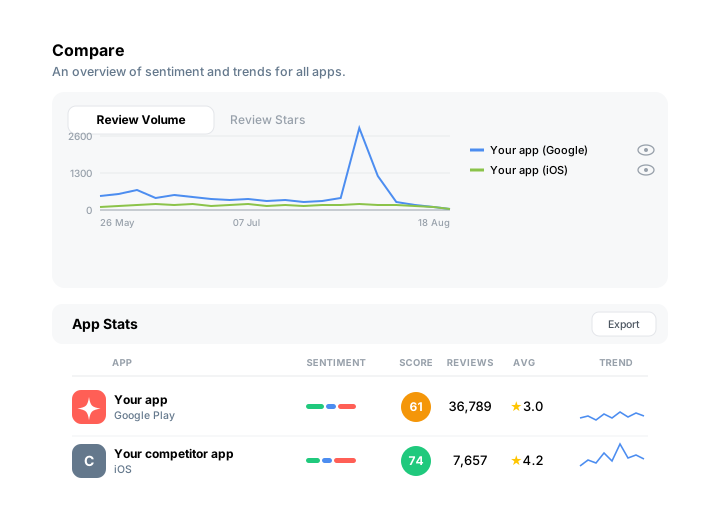
Every app you track on one screen, over whatever date range you choose.
The Compare page puts every app you track on one screen: review volume, average star rating, sentiment, and trend lines showing whether each competitor is climbing or sliding, over whatever date range you choose. Instead of checking each app one at a time, you see the whole competitive field at a glance, and you catch momentum shifts before they show up in your quarterly numbers.
Filter by Topics & Tags or detected language to zero in on a specific theme or market, sort by any column to instantly surface who’s winning and who’s losing ground, and export to CSV or Excel when you need the numbers in a board deck.
Context
Benchmark against your whole category
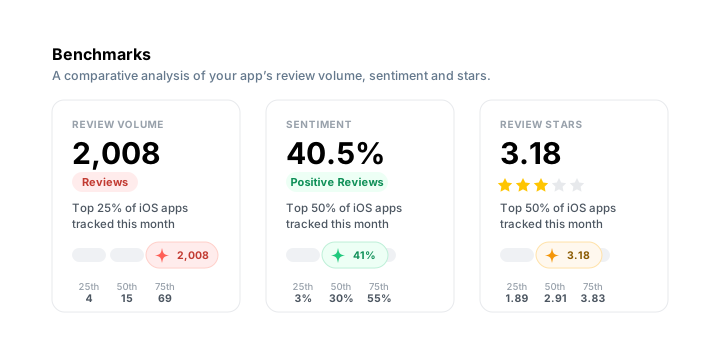
Is a 4.2 good, or is everyone else on 4.5? One rival can't answer that.
A single competitor tells you one story. Benchmarks shows where your app sits against the wider market for review volume, review ratings and positive sentiment over the last 30 days.
Each metric is plotted against the quartiles for all apps in your store, or narrowed to just your genre. It answers the question every exec asks: is a 4.2 good, or is everyone else on 4.5?
Finding the gap
Find the gap you can actually win
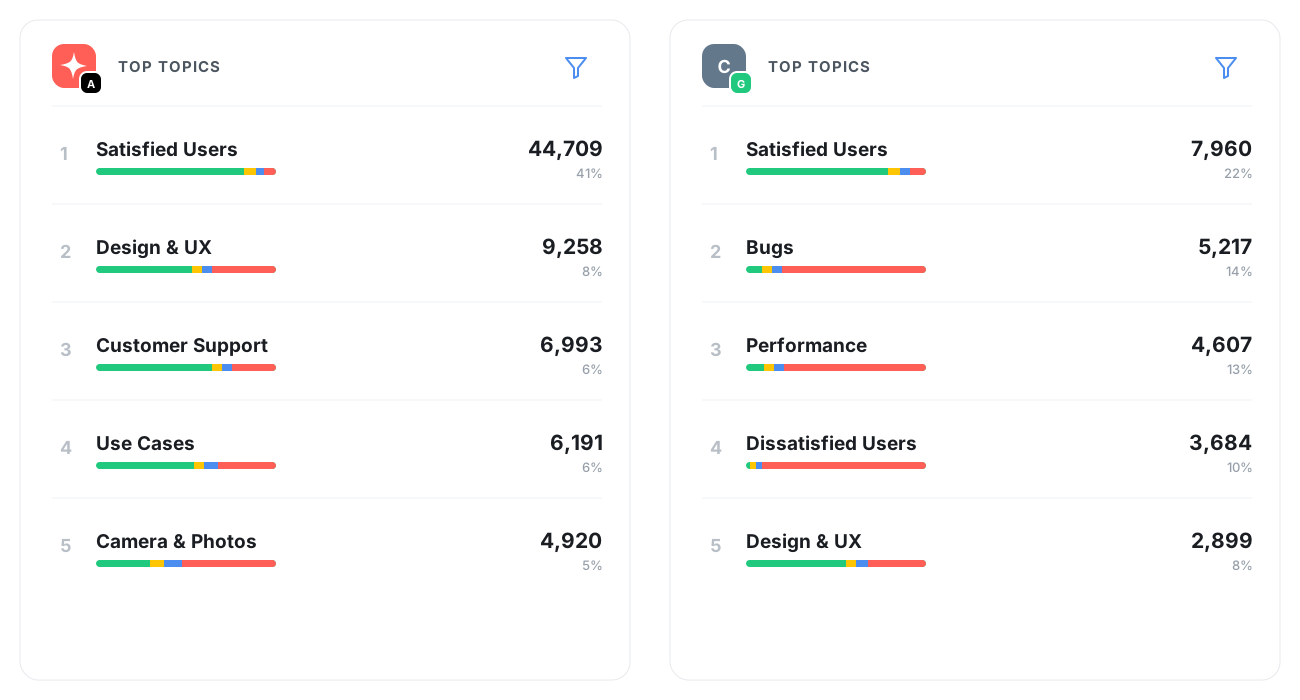
Star ratings show who’s ahead. Topics and sentiment show why, and where your opening is.
Topics reveal what their users talk about. Sentiment reveals how they feel about it. Together, “Bugs” isn’t just a label: it’s their fastest-growing negative theme. Custom Topics let you track category-specific themes so both apps get measured the same way.
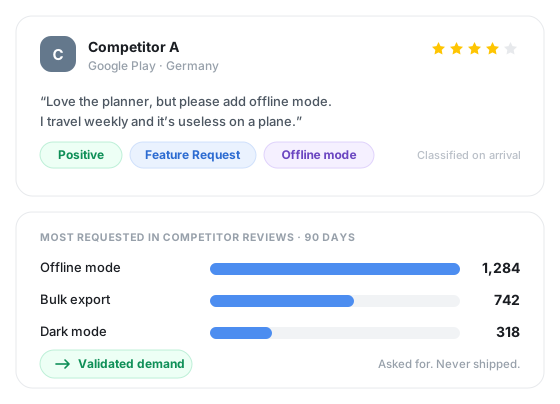
A complaint that dominates their reviews but barely touches yours? That’s a positioning line, an ASO keyword, and a sales battlecard, all at once. A feature their users keep begging for? That’s validated demand, no survey required.
- Which complaints hit their 1–2 star reviews but not yours?
- What features do their users keep requesting?
- Did their sentiment shift after their last release, or yours?
Reporting
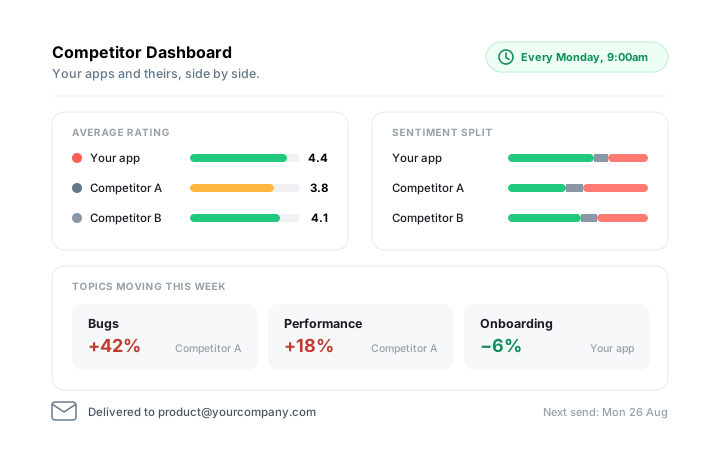
Turn it into a report that runs itself
Competitor analysis usually dies the same way: someone builds a one-off deck, presents it once, and it’s forgotten by the next sprint. By the time anyone circles back, the data is stale and the insight is gone.
Build a competitor benchmark Dashboard instead, with your apps and theirs side by side: ratings, sentiment splits, top topics, latest reviews. Then schedule it to land in your team’s inbox daily, weekly, or monthly, no one needing to remember to pull it.
Scheduled Dashboards turn competitor analysis from a one-time project into a standing input: feeding your roadmap, arming sales enablement, and showing up ready for Monday’s product meeting, automatically, every time. Product gets a running view of where the gaps are, sales gets fresh battlecard material, and leadership gets the competitive picture without asking for it.
Appbot AI
Or just ask a question about them
Competitor reviews are classified the moment they arrive, exactly like your own, so you can ask in plain language instead of building a dashboard.
Ask Appbot
“What are their 1-star reviewers complaining about this quarter?” “Did their rating move after the last release?” Ask the way you’d ask a teammate who has read every review, and follow up in the same thread to narrow to a country, a version or a star rating.
Every answer shows its working: how many reviews it’s based on, the range they span, and the specific reviews behind it, one click away. Because the classification happens before you ask, the same question returns the same numbers tomorrow.
Appbot MCP
Connect Appbot to Claude, ChatGPT, Gemini or any MCP-compatible assistant and your competitor data comes with it. The apps tool lists every source you track, competitors included; review_stats returns sentiment, topics, emotions and ratings sliced by date, version, country or store; reviews pulls the actual reviews behind any number.
So the competitive battlecard, the release-notes comparison or the quarterly summary gets drafted where you’re already working, from the same classified data your dashboards use, not from a hundred reviews pasted into a chat window.
Both are built on the same Appbot AI that classifies the reviews in the first place, using models trained on 400M+ app reviews, at 93%+ sentiment accuracy. Why that matters versus a generic LLM →
Comparison
Why not just read their reviews yourself?
You can, and for a handful of reviews it works fine. It stops working the moment a competitor has thousands of reviews across dozens of countries, or the moment someone asks whether a trend is real or you just remember it that way.
| Manual competitor research | appbot. Competitor Analysis | |
|---|---|---|
| Reviews covered | ✕The first page or two in your own country | ✓Every public review, every country |
| Languages | ✕Whatever you can read | ✓200+ analyzed natively, translation optional |
| Consistency | ✕Depends who did the reading, and when | ✓Same models applied to every app, every time |
| Sentiment & topics | ✕Your impression of the mood | ✓Classified automatically at 93%+ accuracy |
| Category context | ✕Guesswork about what "good" looks like | ✓Benchmarks against store or genre quartiles |
| Trends over time | ✕Gone as soon as the doc is filed | ✓Tracked continuously, pinned to releases |
| Asking a follow-up | ✕Re-read and re-tally it by hand | ✓Ask in plain language, in Appbot or your AI assistant |
| Repeating it | ✕A person, a day, every quarter | ✓A scheduled Dashboard, emailed automatically |
| Sharing it | ✕A deck that goes stale immediately | ✓Live dashboards, exports, Slack and the API |



FAQ
Frequently asked questions about competitor analysis
Can you track a competitor’s app reviews?
Yes. App store reviews are public, so you can track any app you like. You add the competitor’s App Store, Google Play, Mac or Microsoft store listing as a source and Appbot fetches their reviews from every country automatically. You don’t need an SDK, any code, or access to their developer account.
What is app competitor analysis?
App competitor analysis is the process of analyzing reviews and ratings from competing apps to identify product gaps, recurring frustrations and market expectations, then comparing those findings against your own app to decide what to build, fix and say.
How many competitor apps should we track?
Three to five is usually enough: your closest rivals, the category leader, and one challenger doing something different. Each competitor app in each store counts as one source on your plan, the same as your own apps, so you can size a plan around the portfolio you want to watch.
Can we reply to a competitor’s reviews?
No, and neither can anyone else - only the app’s owner can publish replies in the App Store or Google Play. Competitor sources are read and analyze only. Appbot’s reply tools work on the apps where you’ve connected your own developer account.
What about competitor reviews in other languages?
Appbot fetches reviews from every country a competitor app is listed in and analyzes 200+ languages natively. Translation to English is optional per source, and many teams leave translations off for competitor apps to keep their translation allowance for their own reviews.
Can we use AI to analyze competitor reviews?
Yes. Competitor reviews are classified by Appbot AI exactly like your own, so you can query them in plain language two ways. Ask Appbot answers inside the platform and shows the reviews behind every number, and Appbot MCP makes the same data available to Claude, ChatGPT and other MCP-compatible assistants, so you can draft a battlecard or a summary where you already work.
How far back does competitor review history go?
Appbot backfills the public review history available for a competitor app when you add it, so you can analyze past trends straight away. Ratings history is collected from the day you add the source onward and can’t be backfilled, so it pays to add competitors early rather than the week before you need the report.
Is tracking competitor app reviews allowed?
Yes. App store reviews and ratings are published publicly by Apple, Google and Microsoft for anyone to read. Appbot analyzes that public data - it doesn’t access private analytics, install data or anything inside a competitor’s developer account.