
Monitor. Understand. Reply. All in one place.
Appbot monitors your ratings and reviews across the Apple & Google Play Stores, surfaces the bugs, feature requests and feedback that matters, and lets your team reply, all in one place. Ask a question in plain English with Ask Appbot AI and get the answer in seconds, backed by a decade of review intelligence.





















Technology
AI built for app reviews since 2015.
App reviews aren't written like the rest of the web: short, full of emoji, sarcasm and abbreviations. Appbot's proprietary AI was built specifically to read that language, trained on 400M+ real app reviews over more than a decade, and it classifies sentiment, topics and emotions at 93%+ accuracy. Pairing that in-house understanding of review structure with modern LLMs tailored to your data gives best-in-class results, and lets you interrogate your entire review corpus in plain English, in minutes.
Analyze
Emoji as sentiment signals, abbreviations, all-caps frustration, sarcasm. "OMG THIS CRASHED AGAIN 💥" is correctly classified as negative, generic AI would miss it.
How analysis works →Reply
AI drafts and auto-replies are written from each review's rating, sentiment and specifics, guided by that same analysis. Better inputs produce better replies.
How replies work →Ask
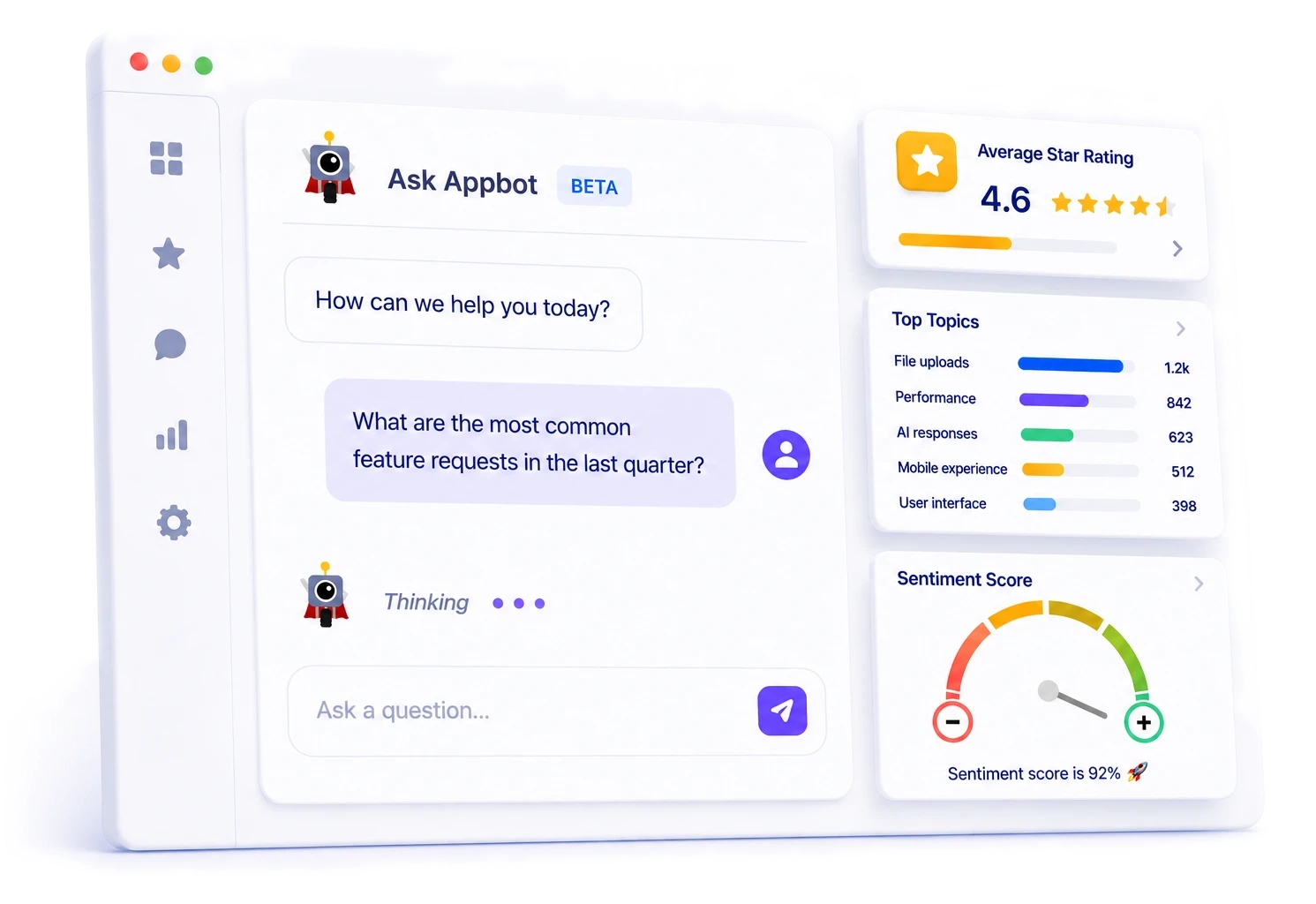
Ask Appbot answers questions about your reviews in plain language, grounded in your own structured sentiment, topic and emotion history.
Explore Ask Appbot →Connect
Appbot MCP brings that same live review intelligence into Claude, ChatGPT and any MCP-compatible AI tool your team already uses.
Explore Appbot MCP →Monitor
Monitor app reviews & ratings
Your app store reviews are the single most honest signal you'll ever get about your product. They're what real users say when they're not being asked by your marketing team. They're also what your next customer reads before they decide whether to install. Appbot saves teams hours every week with powerful integrations and automations, so monitoring is continuous, review alerts land in the tools you already use, and no review goes unread.
Near real-time review monitoring
- New reviews from the Apple App Store and Google Play arrive in your Appbot dashboard as fast as the app stores release them, typically within a few hours of being posted. Your team responds before issues compound and spots trends as they emerge, not days later.
Every country, every store, out of the box
- Appbot collects reviews from every country your app is available in, automatically, from day one. No country-by-country setup, no regional blind spots. See how users feel in Tokyo and Toronto in the same dashboard. See all supported app stores →
Auto-translation to English, original always preserved
- Appbot translates reviews from 30+ languages into English automatically, with the original text always displayed alongside the translation. No copy-pasting into Google Translate, no losing nuance. Your team reads global feedback in a single inbox.
Route reviews to Slack, Teams, Zendesk, and 10+ more
- Send reviews straight to the tools your team already uses. Native integrations with Slack, Microsoft Teams, Zendesk, Freshdesk, Jira, Salesforce, and more. Easily filter by rating, sentiment, topic, or keyword. A full REST API covers everything else. Browse all integrations →
See all your reviews in one place with Appbot
Analyze
How users feel and exactly why
Appbot's analysis AI automatically classifies every review by sentiment, topic, keyword, phrase, and emotion so you can see that "login issues" are driving 23% of 1-star reviews, or that "new design" is trending positively, without reading a single review manually.
Know exactly how users feel in seconds, not hours
- Appbot's sentiment analysis classifies every review as positive, negative, mixed, or neutral with 93%+ accuracy. Our proprietary AI tools are designed with reviews in mind, giving you accuracy well above that of generic tools. Skip the hours of manual reading and get straight to what your users actually think.
See what's actually driving your ratings
- Automatic topic detection groups every review by theme: Bugs, UI, Performance, Onboarding, Pricing, and more. Pinpoint exactly which issues are dragging your stars down and which features are earning you 5-star praise.
Catch trends before they become problems
- Keyword and phrase tracking shows you exactly which terms are rising, falling, or suddenly spiking after a release. Spot emerging bugs, feature requests, and competitor comparisons week over week, while you still have time to act.
Go beyond positive vs. negative
- Emotional analysis reveals why users feel frustration, delight, confusion, joy or loyalty. A confused user needs better onboarding; a frustrated one needs a bug fix. Emotion tells you which changes will actually move the needle.
Track the categories that matter to your product
- Every product has its own vocabulary. Build custom topics with keyword logic to track exactly what matters to your team. Specific feature mentions, competitor names, release versions... all measured consistently across every review, automatically.
Surface actionable insights with Appbot
Try Free for 14 Days →Reply
Reply to app store reviews → improve ratings
Appbot generates a personalised reply draft in one click, or sends it automatically via your rules. No copy-pasting, no tab-switching, no backlog.
AI-drafted replies in one click
- Appbot's AI reply drafts are written specifically for each review, informed by the user's sentiment, topic, and context. Edit or send as-is. Skip the blank-page moment and turn a 5-minute reply into a 5-second one.
Auto-reply rules that run while you sleep
- Set up rules by rating, topic, or language and let Appbot handle selected replies automatically. Thank your 5-star reviewers, acknowledge every bug report, or respond in the user's own language, with zero ongoing effort from your team.
Canned replies for your most common review types
- Build a library of pre-written responses for the reviews you see again and again. Make handling crash reports, pricing complaints, feature requests fast and lightweight. One click and the reply is drafted, simply personalise and hit send.
Reply from wherever your team already works
- Reply directly from Appbot, Slack, Zendesk, Freshdesk, Kustomer, Salesforce, Microsoft Teams, and more. Every reply posts back to the App Store or Google Play automatically. No copy-pasting, no context-switching, no missed replies. See all reply integrations →
Reply faster and lift your rating with Appbot
Improve
Ship the right things, watch your ratings climb
Your users are already telling you what to build next, what to fix first, and what's dragging your rating down. Appbot turns that feedback into roadmap decisions, bug tickets, and measurable rating improvements so every release compounds on the last one.
Build the features users are actually asking for
- Stop guessing at your product roadmap. Appbot surfaces the most-requested features, the biggest pain points, and the patterns hidden across thousands of reviews so you ship changes based on real user demand, not internal debate. Explore topic & keyword analysis →
Catch bugs before they tank your rating
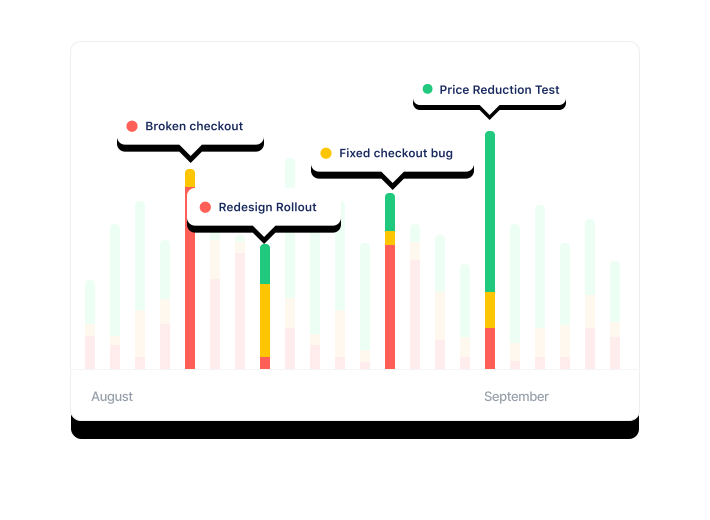
- Turn your reviews into an early-warning system. Appbot spots spikes in crash reports, performance complaints, and new bug mentions the moment they start - often before your error-tracking tools catch them. Fix issues before they become 1-star reviews. How sentiment analysis catches issues early →
Measure the impact of every release
- See exactly how each version changes user sentiment. Appbot's version tracking shows you whether your latest release lifted or hurt your ratings, which features got praise, and which changes backfired so you learn from every update.
Lift your star rating, one reply at a time
- Replying to negative reviews within hours often triggers users to update their rating - frequently to 4 or 5 stars. Combined with a faster fix cycle, this is the compounding loop that turns a 4.1-star app into a 4.6-star one.
Share user feedback across your whole team
- Across product, engineering, support and marketing, everyone benefits from seeing real user voices. Custom email reports, Slack and Teams feeds, and shareable dashboards keep the whole company aligned on what users actually want.
Lift your star rating with Appbot
Use cases
App feedback you need, how you need it.
Many different teams. Completely different workflows. One platform.
Product managers
Make data-driven roadmap decisions based on the feedback and sentiment of real users.
How Product Teams use Appbot →Customer support
AI-generated reply drafts, auto replies, and canned responses to handle reviews faster, at scale.
How Support Teams use Appbot →Developers
Surface bug reports, performance issues and crash patterns in reviews before they tank your ratings.
How Engineering Teams use Appbot →Growth
Time campaigns to rating health, mine reviews for ad copy, and track competitor updates.
How Growth Teams use Appbot →Integrations
Reviews delivered right into your workflow
Connect Appbot to your existing tools in minutes. New reviews route to the correct tool automatically. No manual checking, no copy-pasting, no missed feedback.
Slack
Route reviews to any channel by rating, sentiment, topic, or keyword. Whole team sees feedback in real time.
Learn more →Microsoft Teams
Post review alerts directly into Teams channels. Keep support and product teams looped in without leaving Teams.
Learn more →Zendesk
Turn 1-star reviews into Zendesk tickets automatically. Reply from Zendesk and the response posts back to the store.
Learn more →Freshdesk
Negative reviews become Freshdesk tickets the moment they're posted. Respond directly from your existing support workflow.
Learn more →Salesforce
Push review data and sentiment scores into Salesforce records. Connect app feedback directly to your CRM and customer data.
Learn more →Jira
Create Jira issues directly from bug reports in reviews. Bridge user feedback and your engineering backlog automatically.
Learn more →Google Chat
Send review alerts straight into Google Chat spaces. Keep everyone on Google Workspace looped in on new feedback in real time.
Learn more →API
Full RESTful API for custom integrations. Pull review data, ratings, sentiment scores, and topics into any internal tool or dashboard.
See API docs →Customer love
What teams say about Appbot
From product managers to support leads, teams rely on Appbot to turn reviews into decisions.

“Appbot has seriously changed how our entire company views our product. The daily stream of reviews into Slack has opened up transparency across every team — people LOVE it.”


“We really love this product — it alleviated so much pain from all the manual work we had to do. We truly all feel this was the best tool we purchased last year.”


“Appbot is the straightforward, all-in-one-place tool we use for 30 minutes each week to monitor user reviews of our iOS and Play Store apps. Exactly what we needed.”

Why Appbot
Not all app review analysis and reply tools are built the same
The only platform with proprietary AI trained on 400M+ app reviews with full reply automation. Trusted by 25%+ of the Fortune 100 and used by 35% of the top charting app developers
See the difference on your own app's reviews.
FAQ
Answers to your questions
Everything you need to know about monitoring, analyzing, and replying to app store reviews with Appbot.
What is Appbot?
Appbot is an app review and ratings intelligence platform used by 25%+ of Fortune 100 companies. It monitors, analyzes, and replies to reviews from the Apple App Store, Google Play, and Microsoft Store. Appbot's proprietary AI, trained on 400M+ real app reviews, classifies sentiment, topics, emotions, and keywords automatically, so product, support, and growth teams can act on user feedback in minutes instead of days.
How does app review sentiment analysis work?
App review sentiment analysis uses AI to automatically classify each review as positive, negative, mixed or neutral based on the language it contains. Appbot goes further by detecting specific emotions, topics, and keywords, including app-specific signals like emoji, sarcasm, abbreviations, and all-caps frustration. Every review is analyzed automatically as it arrives, with no manual tagging required.
Which app stores does Appbot support?
Appbot supports the Apple App Store (iOS and macOS), Google Play and Microsoft Store. Reviews are collected from every country each store is available in, and translated reviews can be auto-translated to English. You can also monitor competitor apps across any of these stores.
How do I reply to App Store and Google Play reviews?
Appbot lets you reply to both App Store and Google Play reviews from a single inbox. Connect your developer accounts once, then reply directly from Appbot, from Slack, from Zendesk, or from whichever tool your support team already uses. AI-drafted replies and canned responses are available, and replies post back to the store automatically.
How do I monitor competitor app reviews?
In Appbot, you can track unlimited competitor apps alongside your own without installing anything, just add the competitor's App Store or Google Play URL. You'll see their review volume, ratings trends, sentiment, top topics, and version impact in the same dashboard as your own apps, making it easy to benchmark performance and spot market gaps.
Does Appbot integrate with Slack, Zendesk, and Jira?
Yes. Appbot has native integrations with Slack, Microsoft Teams, Zendesk, Freshdesk, Jira, Salesforce, Tableau, and more. You can route reviews by rating, sentiment, topic, or keyword to any channel or ticketing system. A full REST API and Zapier support cover anything not natively integrated.
How long does it take to set up Appbot?
Setup takes about 5 minutes and doesn't require an engineer. Add your app's App Store or Google Play URL, connect the integrations you use (Slack, Zendesk, etc.), and Appbot immediately backfills your full historical review data so you can start analyzing. No credit card required for the 14-day free trial.
What is the best app analysis and review reply tool?
Appbot is one of the best tools for app review analysis and replies, used by 25% of Fortune 100 companies and 35% of top charting apps. It uses proprietary, purpose-built AI to analyze sentiment, topics, and emotions, covers all major app stores, and automates replies with AI-drafted responses and Auto Replies. Setup takes minutes with a free 14-day trial.
How do I improve my app's star rating?
The fastest way to improve your app's star rating is to monitor reviews continuously so issues don't compound, reply to negative reviews quickly (which often triggers users to update their rating), and use sentiment and topic analysis to feed fixes and improvements into your product roadmap. Appbot supports all three in a single platform.
Can Appbot translate non-English reviews?
Yes. Appbot auto-translates reviews from 30+ languages into English so your team can read and reply to global feedback from a single inbox. Sentiment, topic, and emotion analysis run on reviews in their original language, so classification accuracy isn't degraded by translation.
How much does Appbot cost?
Appbot offers plans starting at a price that scales based on the number of apps you track and the features you need. All plans include a 14-day free trial with no credit card required. See the pricing page for current plan details.
Is there a free trial?
Yes, Appbot offers a free 14-day trial with no credit card required. You can set up in 5 minutes, connect your apps, and see real sentiment analysis and topic extraction on your actual review history before committing.
Are replies unlimited?
Yes. You can send as many replies as you wish per month. Each person on your team who replies to reviews will need their own Appbot account.
What are sources?
A source is a single app in a single app store. For example, your iOS app and your Google Play app would count as 2 sources. Appbot fetches reviews for all countries for each source you track.
How many sources can I track?
You can track 5 sources on the Small plan, 40 on the Medium plan, and 100 on the Large plan. If you need more, custom enterprise plans are available.
How are translations counted?
For each source, you may choose to have non-English feedback translated to English. A translation is counted for each complete piece of feedback (e.g. 1 review) that we translate. For team members tracking the same sources, we count unique translations only.




Ready to better understand your apps?
Quick setup•Free for 14 days•No credit card required