

MCP Server for App Store & Google Play Reviews
Connect Claude, ChatGPT and other AI assistants to your App Store and Google Play reviews with Appbot MCP.
Ask questions about app ratings, sentiment, bugs, feature requests and customer feedback in natural language, using Appbot's proprietary review intelligence.
No manual exports. No copying reviews into AI chats. Just reliable app review insights in the AI tools your team already uses.
Over 25% of the Fortune 100 and 35% of top charting app developers use Appbot


























See it in action
See how Appbot MCP turns reviews into actionable insights
Watch how an AI assistant uses Appbot MCP to identify bugs, analyze customer sentiment and uncover feature requests from app reviews.
Overview
What is an MCP server for app reviews?
An app review MCP server connects AI assistants to app ratings, reviews and customer feedback using the Model Context Protocol (MCP).
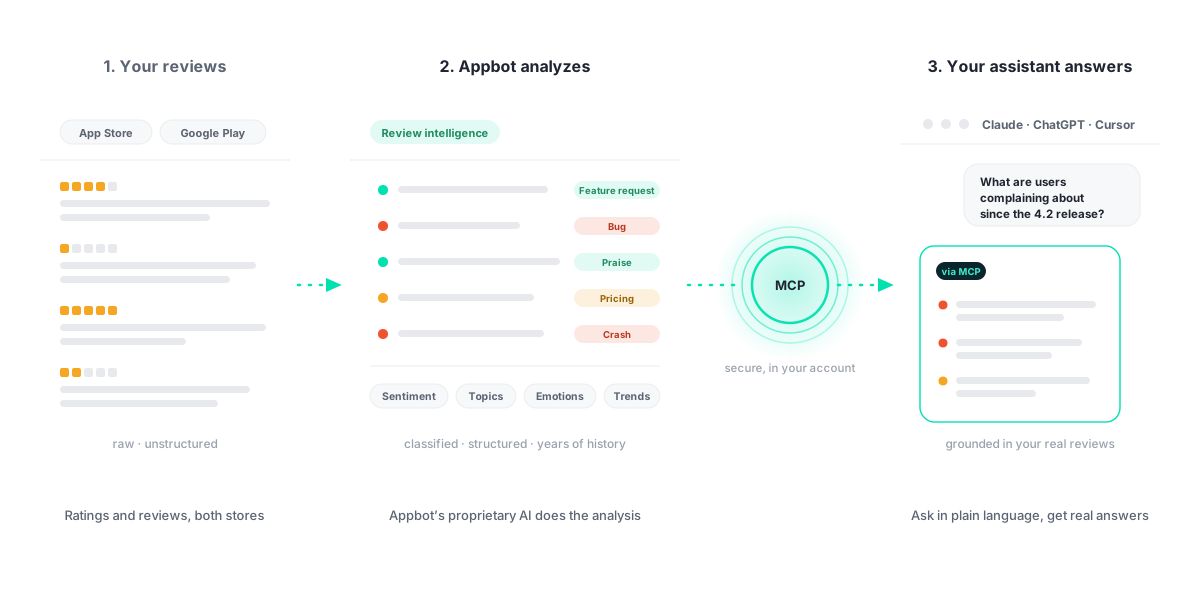
Appbot MCP lets compatible AI tools, including Claude and ChatGPT, securely access structured app review intelligence from Appbot. This includes sentiment analysis, ratings, topics, emotions, review metadata and historical trends across the apps you track.
Instead of manually exporting reviews or searching dashboards, you can ask your AI assistant questions about customer complaints, bugs, feature requests, competitors and changes in sentiment over time.
Appbot’s proprietary AI analyzes the reviews. Your connected AI assistant uses that intelligence to answer questions and support your workflows.
Why it matters
An assistant is only as good as what it can see
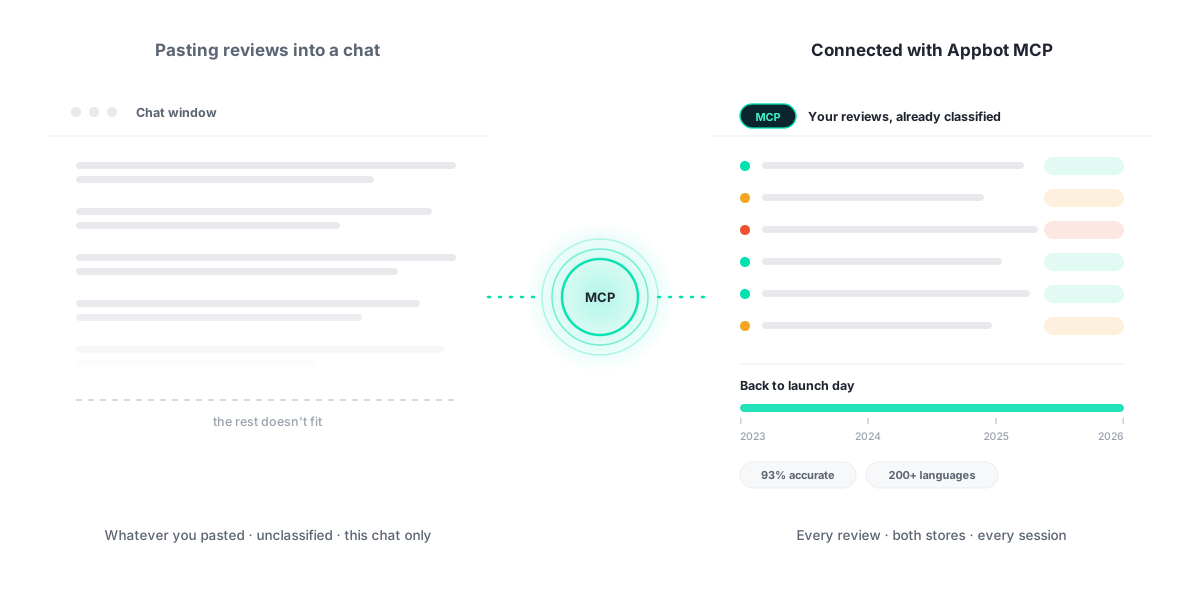
Paste a hundred reviews into a chat and you get an opinion about a hundred reviews. Appbot MCP gives your assistant the whole picture – every review from both stores, already classified, going back to the day your app launched.
400M+ Records
Appbot’s proprietary models were trained on 400 million app reviews, so your assistant reads analysis built for how app users actually write.
93% Sentiment Accuracy
Every review is classified once, consistently, before your assistant ever asks. Same review, same answer, every session.
Not Just This Chat
Trends, version comparisons and country breakdowns across years of reviews – the context a chat window cannot hold.
How it works
One open standard. Every assistant you use.
MCP (Model Context Protocol) is an open standard for connecting AI assistants to the tools and data they need. Appbot runs an MCP server, your assistant connects to it, and your reviews become something it can query – securely, with your permissions, in your own account.
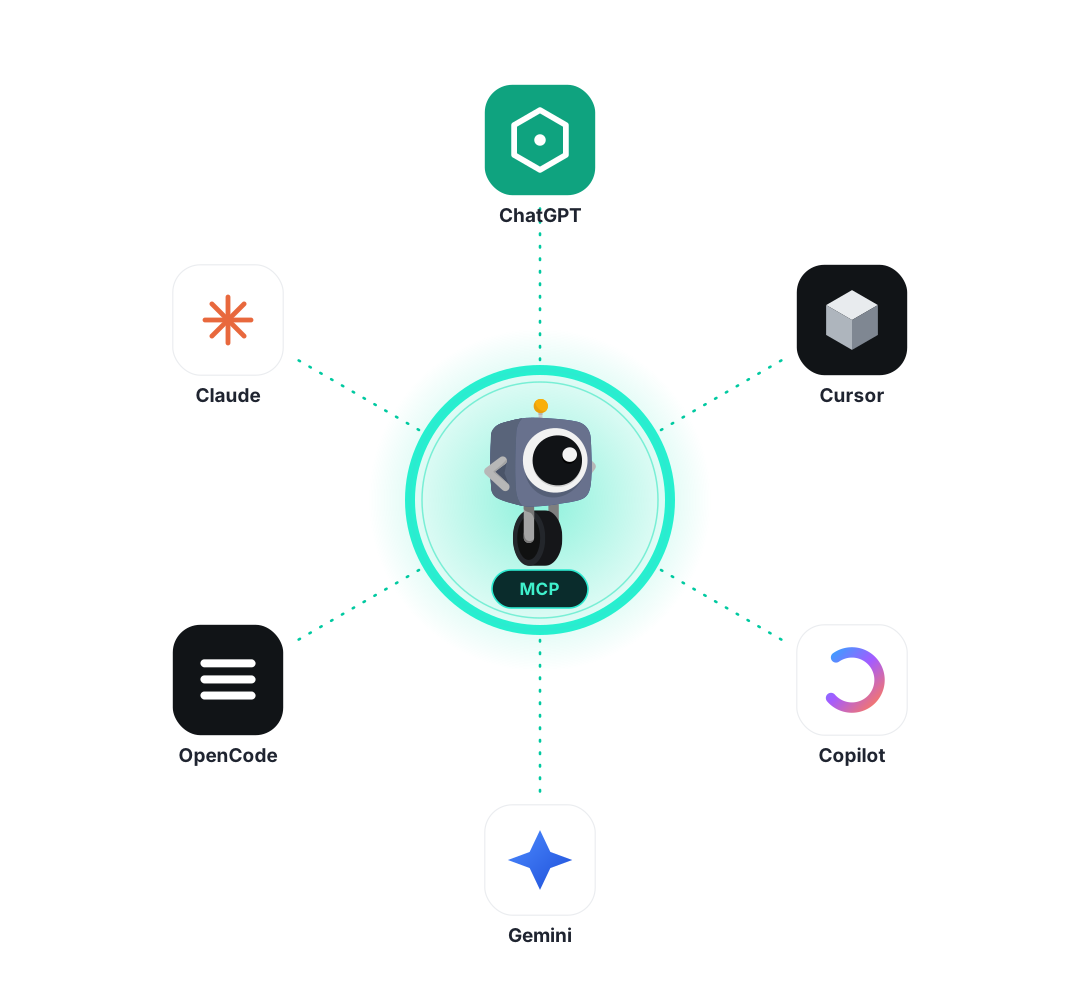
Connect Appbot once and the same classified review intelligence is there for Claude, ChatGPT, Gemini and any other MCP-compatible assistant your team reaches for.
Grounded answers
Ask in plain language. Get grounded answers.
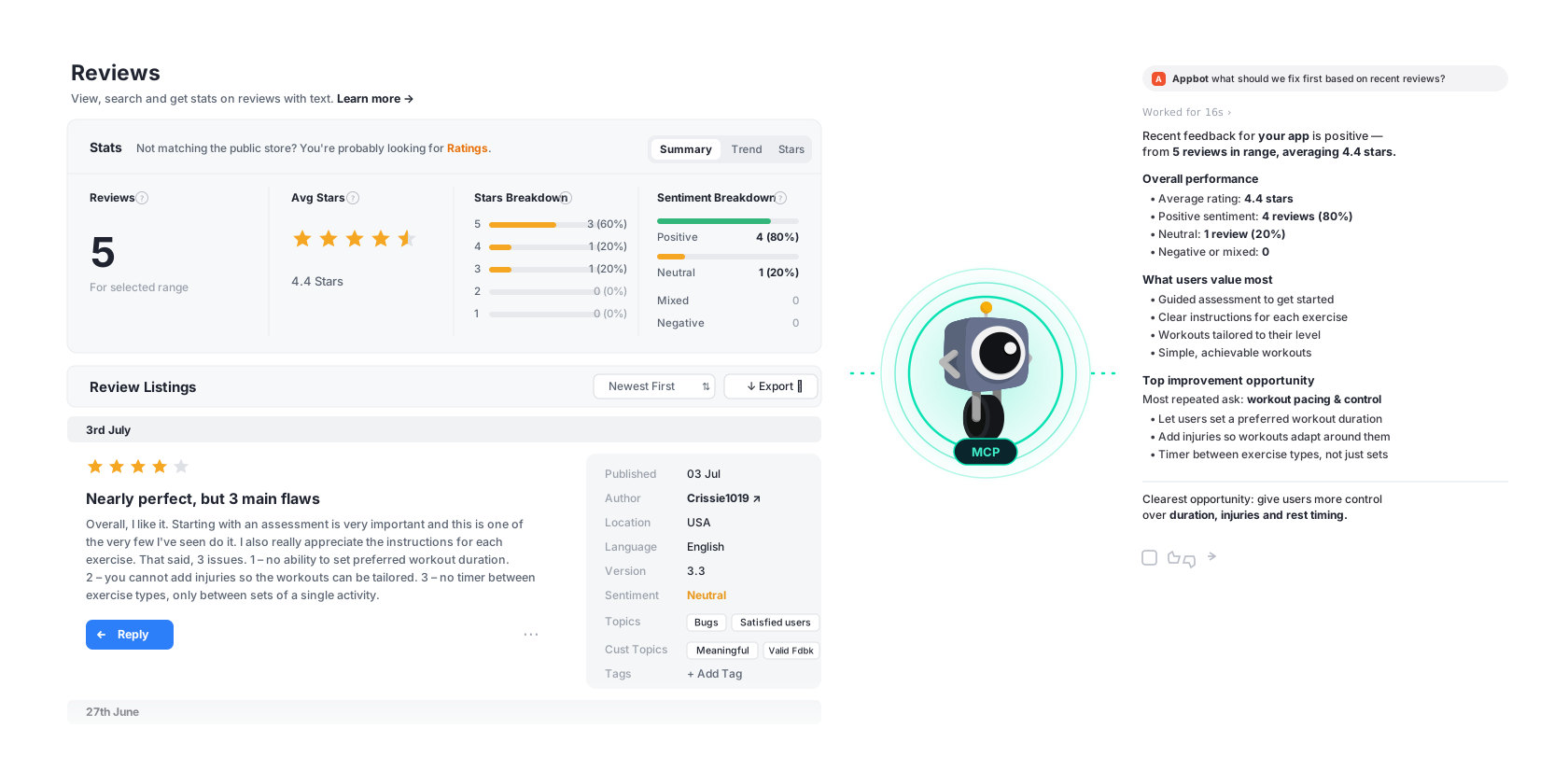
Your assistant decides which Appbot data it needs and fetches it. You don't write queries, pick filters, or remember what a topic ID is. You ask what you'd ask a teammate.
Because answers come from Appbot's structured intelligence rather than raw pasted text, they're the same numbers your dashboards show – and the same numbers you can put in front of your exec team.
Tools
What your assistant can reach for
Three tools, exposed over MCP. Your assistant picks the right one for the question you asked.
appsWhich apps am I tracking? Your sources across the App Store, Google Play, macOS and Microsoft Store – including competitor apps.
review_statsWhat changed? Aggregated sentiment, topics, emotions and ratings, sliced by date, version, country or store.
reviewsShow me the receipts. The actual reviews behind any number, filtered and paged, with their classification attached.
Division of labour
Analysis stays in Appbot. Work happens where you are.
Your assistant isn't guessing at sentiment. Appbot has already done that work with purpose-built models – MCP just hands the results over. Emoji, sarcasm, all-caps frustration and 200+ languages are handled before your assistant sees a thing.
So the assistant spends its effort on the part it's good at: writing the release notes, drafting the ticket, summarising the quarter, arguing with your roadmap.
// Appbot returns classified data, not raw text
{
  "topic": "Sign-in",
  "sentiment": "negative",
  "emotion": "frustration",
  "version": "8.4",
  "country": "DE",
  "reviews": 412,
  "change_vs_prior": "+412%"
}
In practice
What Can You Analyze with Appbot MCP?
Same connection, six very different jobs.
Identify Feature Requests from App Reviews
Surface the features users ask for most, ranked by how many people mention them and how that is changing. Ask your assistant to group requests by theme, quantify demand and pull the reviews behind each one.
Example question
“Which feature requests are growing fastest this quarter, and how many users asked?”
Find Bugs in App Reviews Using AI
Identify recurring crashes, login failures, performance issues and other bugs reported in App Store and Google Play reviews. Ask Claude or ChatGPT to compare feedback across app versions and spot issues emerging after a release.
Example question
“What are the most common bugs reported since version 8.4? Compare them with the previous version and show the reviews supporting each issue.”
See it in action:Watch how Appbot MCP identifies bugs after an app update.
Analyze App Review Sentiment with Claude or ChatGPT
See positive and negative trends by date, version and country. Ask your assistant to summarise complaints by theme, measure the sentiment behind each one and surface the reviews worth replying to first.
Example question
“Summarise this week's 1 star reviews by theme so I can brief the team.”
Monitor App Reviews After a Release
Compare the weeks before and after a release to catch emerging issues early. Ask your assistant how ratings and sentiment shifted, which topics are new, and whether the trend is still moving.
Example question
“Compare the two weeks after 9.0 with the two weeks before. What changed, and is it getting better or worse?”
Analyze Competitor App Reviews with AI
Compare competitor reviews with your own to see where rivals are praised or criticised. Ask your assistant to find the gaps between you and them, and the words users use to describe each.
Example question
“What do our competitors' users complain about that ours don't?”
Turn App Reviews into Product Insights
Get a defensible view of what customers think without reading thousands of reviews. Ask your assistant for the headline themes, the numbers behind them and the reviews that back up every claim.
Example question
“How has sentiment moved over 12 months, and what drove each turn?”
Worked example
Find bugs after an app update
You ask
“What are the most common bugs reported since version 8.4? Compare them with the previous version and show the reviews supporting each issue.”
What happens
Your assistant calls Appbot MCP for review statistics on version 8.4 and the version before it, then pulls the reviews behind each issue. It ranks the bug-related topics by volume and change, and cites the reviews that back each one.
See it in action:Watch the demo.
Top bug-related topics since 8.4, compared with 8.3:
| Issue | Reviews | Change |
|---|---|---|
| Login failures | 42 | +68% |
| App crashes | 31 | +35% |
| Notifications | 18 | +12% |
Each issue links to the supporting reviews, so you can read exactly what users said.
Illustrative response. Figures are examples, not live data.
Setup
Connected before your coffee's cold
No SDK, no deploy, no ticket for the platform team.
Add the server to your assistant
Connect Appbot MCP to Claude, ChatGPT or another MCP-compatible AI assistant using https://api.appbot.co/mcp
Follow our step-by-step setup guides:
Ask your first question
Your assistant can now access the apps you track in Appbot. Try asking: “What are my top complaints this month?”
Comparison
Can't you just paste reviews into ChatGPT?
You can – and for twenty reviews, it's fine. It stops being fine the moment you need a number you would defend in a meeting, a trend that predates the chat, or an answer that's the same on Tuesday as it was on Monday.
| Pasting reviews into a chat | Appbot MCP | |
|---|---|---|
| What the assistant sees | ✕Whatever fits in the window | ✓Your full review history, live |
| Sentiment | ✕Guessed fresh each prompt | ✓93% accurate, already classified |
| Topics & emotions | ✕Ad-hoc, if you ask for them | ✓Automatic, plus your Custom Topics |
| Change over time | ✕No memory between chats | ✓Years of trends, pinned to releases |
| Consistency | ✕Varies run to run | ✓Same review, same result — always |
| Competitor apps | ✕Collect them yourself | ✓Tracked alongside your own |
| Effort per question | ✕Export, paste, repeat | ✓Connect once, then just ask |
| Languages | ✕Translate before pasting | ✓200+ analyzed natively |
The honest version: generic AI is a good reader and a poor analyst. Appbot does the analysis; your assistant does the thinking. More on why generic AI isn't enough →
Trust
Your reviews stay yours
Your account, your scope
The connection is authorized by you and sees only the sources your Appbot account already has access to. Revoke it any time.
No training by Appbot's AI
Appbot's own AI features don't train on your data. Your connected assistant's data practices are governed by your agreement with its provider. See our Data Privacy & Security policy.
Read access, by design
MCP surfaces your review data for analysis. Publishing replies stays inside Appbot’s AI Replies and Auto Replies, with your approval rules.
FAQ
Frequently asked questions about Appbot MCP
What is MCP (Model Context Protocol)?
MCP (Model Context Protocol) is an open standard that lets AI assistants connect securely to external data and tools. Instead of you copying information into a chat, the assistant requests exactly what it needs, when it needs it. Appbot MCP is Appbot's implementation of that standard.
Which AI assistants can I use Appbot MCP with?
Any MCP-compatible client, including Claude and ChatGPT. Because MCP is an open standard, assistants that add support later will work without any change on your side.
What's the difference between Ask Appbot and Appbot MCP?
Ask Appbot is conversational AI inside the Appbot platform. Appbot MCP brings the same review intelligence into external AI assistants, so you can analyze reviews alongside your other tools and workflows. Most teams use both: Ask Appbot for a quick answer while they are already in Appbot, MCP for work that spans other tools.
Which plans include Appbot MCP?
Appbot MCP is available on our Large and Premium plans, alongside Ask Appbot, AI Replies and Auto Replies. Analysis AI – sentiment, topics, emotions and keywords – is included on every plan. See the Pricing page for current limits.
Is my review data used to train third-party AI models?
No. Appbot's own AI features don't train the underlying foundation models that power them on your data. If you connect your own AI assistant through Appbot MCP, that assistant's data practices are governed by your agreement with its provider, not by Appbot. Full details are in our Data Privacy & Security documentation.
Do I need a developer to set up Appbot MCP?
No. Generate the connection in Appbot, add the server to your assistant, and authorize. If you can add a Slack integration, you can do this.
Can my assistant reply to reviews through MCP?
Appbot MCP gives your assistant access to review data for analysis. Drafting and publishing replies to the App Store and Google Play happens in Appbot, where AI Replies and Auto Replies keep tone, rules and approvals under your control.
Does Appbot MCP cover competitor apps?
Yes. Any source you track in Appbot is available through MCP, including competitor apps. Ask your assistant to compare your reviews against theirs the same way you would ask about your own.
Can ChatGPT analyze App Store and Google Play reviews?
Yes. ChatGPT can analyze app review data through Appbot MCP when used with a compatible MCP connection. Appbot provides structured review intelligence, including sentiment, topics, ratings and historical trends, so ChatGPT can answer questions using the feedback in your Appbot account.
Can Claude identify bugs and feature requests in app reviews?
Yes. With Appbot MCP, Claude can access app reviews and Appbot's existing classifications to identify recurring complaints, bugs and feature requests. Teams can compare issues across app versions, time periods and platforms, and inspect the supporting reviews.
Do I need to export reviews to use them with AI?
No. Appbot MCP gives compatible AI assistants access to the review intelligence available in your Appbot account. You can ask questions without repeatedly downloading CSV files or copying reviews into a chat.
Can I analyze competitor app reviews with MCP?
Yes. Appbot MCP can access competitor apps already tracked in your Appbot account. You can compare ratings, sentiment, recurring complaints and feature requests to identify opportunities and understand differences in customer experience.
Does Appbot MCP support sentiment analysis over time?
Yes. Appbot MCP exposes structured sentiment statistics and review data that can be filtered by time period, app version, country and store. This allows your AI assistant to investigate changes in customer sentiment and the feedback contributing to those changes.
Is Appbot MCP the same as the Appbot API?
No. Appbot MCP provides an MCP interface designed for compatible AI assistants to access review data and analysis through available tools. The Appbot API is a separate programmatic integration intended for applications and custom data workflows.