

How Subscription Cancellation Issues Impact App Ratings (and What to Fix)
Published 14th October, 2026 by Claire McGregor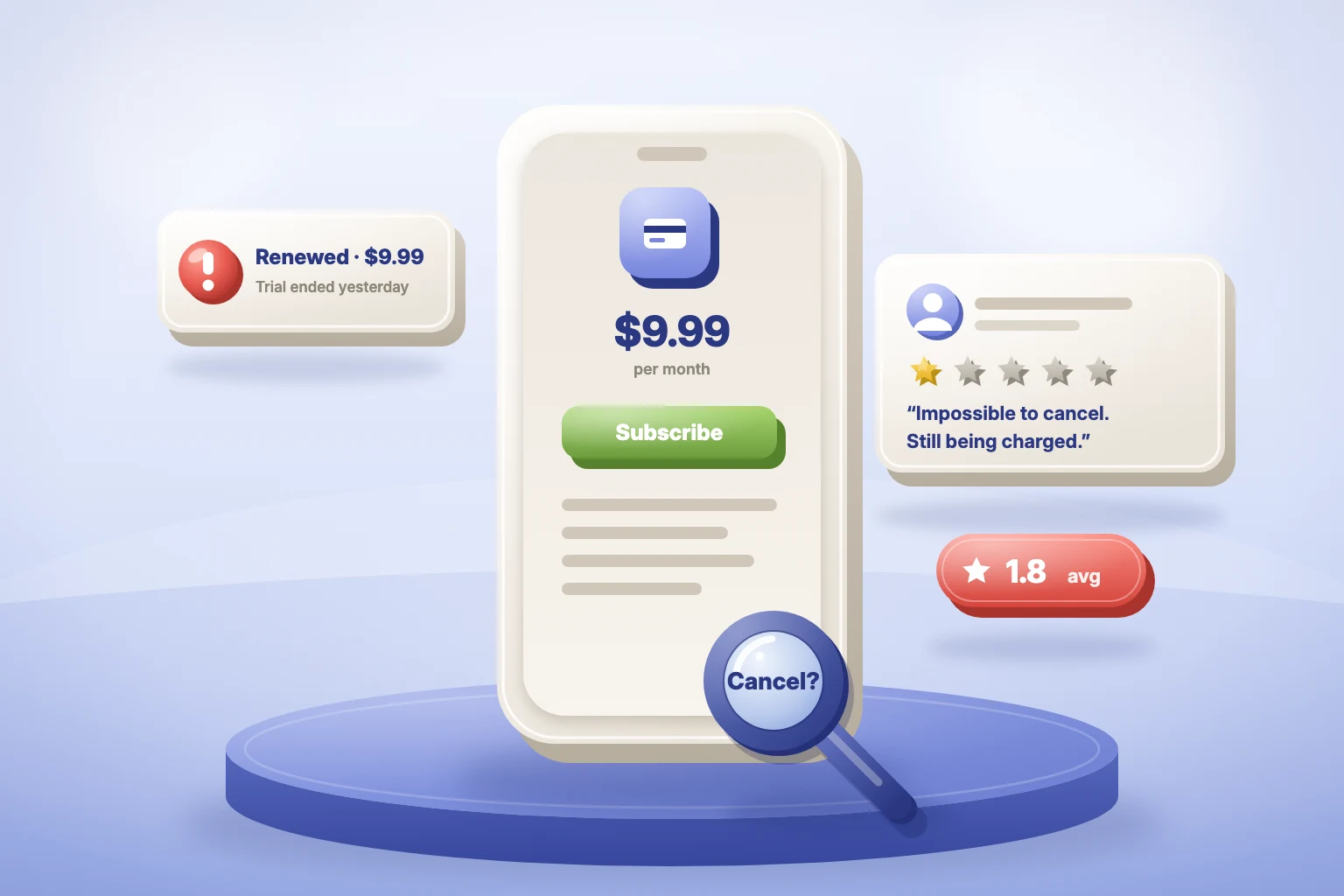 Subscription cancellation issues are one of the biggest hidden drivers of negative app reviews. When users can’t cancel easily, get charged unexpectedly or can’t get a refund, they don’t shrug it off. They leave a 1-star review. Those reviews sit at the very bottom of your rating distribution. That gives them outsized weight on your average, your store conversion and your reputation. Most subscription apps don’t lose users because the product is bad. They lose them at the billing step.
 In this guide you'll learn:
- Why billing reviews hit your rating harder
- Case study: what 11,448 reviews show
- Where subscription experiences break down
- Regulation is catching up to subscription design
- The fix checklist
- How to find billing issues in your reviews
- How to reply to billing reviews
- The bottom line
- FAQ

Turn negative reviews into opportunities
Try Appbot AI Replies, free for 14 days →Why billing reviews hit your rating harder
Billing complaints don’t just add negative reviews. They add the most extreme ones. A missing feature might cost you a star. A surprise charge costs you four. The maths is brutal. For an app averaging 4.5 stars, every 1-star review takes seven 5-star reviews to cancel out. A steady trickle of billing complaints quietly drags your average down, release after release.
Three things make billing reactions so strong:
- Money. It’s a direct loss, not an inconvenience.
- Trust. An unexpected charge feels like a broken promise, not a bug.
- Control. When cancel is hard to find, users feel trapped. Trapped users go public.
Timing makes it worse. A user who’s already leaving has nothing to lose, so their review is their last word. And because they were paying customers, prospective buyers read them as credible.
Payment issues don’t reflect your average experience. They define your worst one.
Case study: what 11,448 reviews show
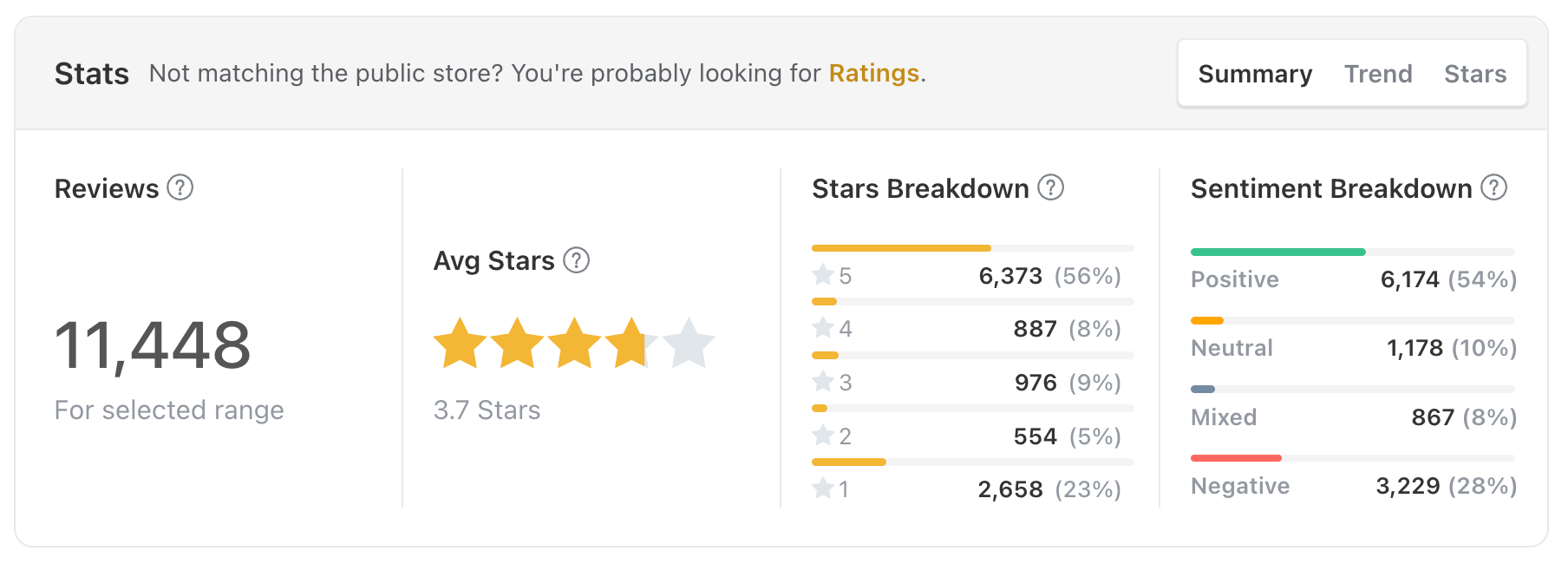
We analysed 11,448 reviews from a subscription-based health app. The overall picture looked healthy: 3.7 stars on average, with 56% of reviews at 5 stars and 54% positive sentiment. The billing picture did not.
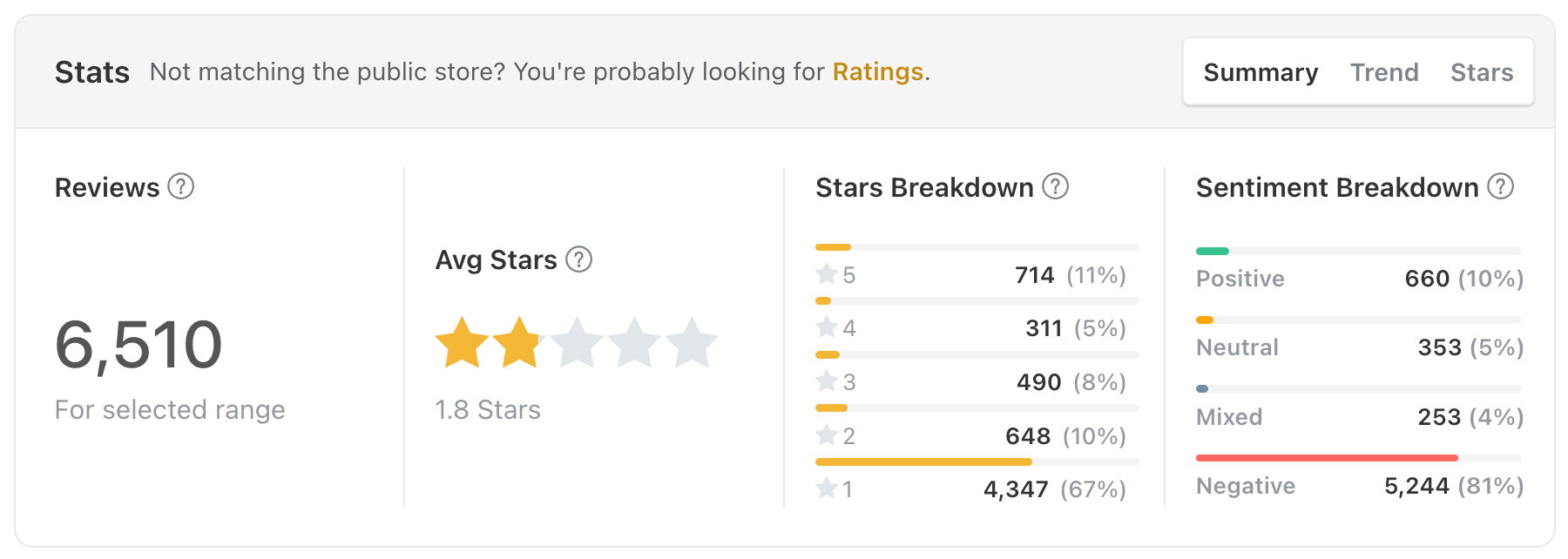
Payment reviews told a different story. They averaged just 1.8 stars. Two in three were 1-star, and 81% carried negative sentiment.
| All reviews | Payment-related reviews | |
|---|---|---|
| Reviews | 11,448 | 6,510 |
| Average rating | 3.7 stars | 1.8 stars |
| 5-star share | 56% | 11% |
| 1-star share | 23% | 67% |
| Positive sentiment | 54% | 10% |
| Negative sentiment | 28% | 81% |
That gap is the story. One app, two experiences: the product users enjoy, and the billing flow they resent. The 1-star share nearly triples once money is involved.
The complaints were specific and repetitive:
“I cancelled before the trial ended but was still charged.”
“It is nearly impossible to cancel the subscription.”
“I unsubscribed but I am still being charged.”
“I was charged twice.”
None of these are product flaws. Every one maps to a flow you can fix.
Where subscription experiences break down
Billing complaints cluster in five predictable places. Predictable means fixable.
| Failure point | What users experience | The fix |
|---|---|---|
| Free trial confusion | They didn’t realise the trial converts to paid, or when | Show the first charge date and amount on the paywall. Remind them before the trial ends. |
| Cancellation friction | Cancel is buried, sends them elsewhere, or loops through offers | One clear “Manage subscription” link in settings. One retention offer, max. |
| Unexpected charges | Annual renewals, price rises or double billing they didn’t see coming | Renewal reminders, clear price-change notices, checks for duplicate subscriptions. |
| Refund issues | Slow, denied, or bounced between you and the store | Tell users exactly where to request a refund, with a direct link. |
| Poor support | Slow or copy-paste replies turn frustration into anger | Reply fast, reply specifically, route billing to a dedicated queue. |
Users rarely complain that cancelling is possible. They complain that it was hard, hidden or surprising.
The app store catch: Apple and Google bill, you get the blame
On iOS and Google Play, the store handles billing. Users cancel in their Apple or Google account, not in your app. Most don’t know that. So when they can’t find cancel inside your app, they blame you. When a renewal goes through, the review lands on your page, not the store’s.
You can’t change how the stores bill. You can close the gap:
- Link straight to the store. Add a “Manage subscription” option in settings that opens the store’s subscription screen. Both stores support this.
- Say where cancelling happens. Put it in your in-app help and FAQ, in plain words.
- Show the billing platform. If you also sell on the web, tell users where they’re billed. Cross-platform double billing is a common source of “charged twice” reviews.
- Point refunds to the right place. Apple refunds go through reportaproblem.apple.com. Google Play refunds start from the user’s order history.
Apple’s Retention Messaging API can also help here. It lets you show a message at the moment a user cancels, so you can explain options instead of losing them in silence.
Regulation is catching up to subscription design
Subscription traps are shifting from a product problem to a legal one. The UK and Australia now have dates. The EU has a proposal on the way. The US is in flux. For the full picture on compliance, including refund rules by platform, see our guide to auto-renewal laws for app developers.
| Region | Status (Oct 2026) | What it means for apps |
|---|---|---|
| 🇬🇧 United Kingdom | DMCCA subscription rules start January 2027, brought forward from spring 2027 (TLT) | Pre-contract information, renewal reminders, cooling-off rights and easy exit (Baker McKenzie) |
| 🇦🇺 Australia | Unfair trading practices law passed; subscription traps banned from 1 July 2027 (Bright Law) | Upfront and ongoing information, plus an easy way to cancel, including online in some cases. The ACCC already acts on traps under existing law (King & Wood Mallesons) |
| 🇪🇺 European Union | Digital Fairness Act proposal expected Q4 2026 (Heuking) | Expected to require cancelling as easily as subscribing and to target trials that silently convert (AKD) |
| 🇺🇸 United States | The FTC’s federal click-to-cancel rule was vacated in July 2025. The FTC reopened rulemaking in March 2026; no replacement yet (SubTracker) | State auto-renewal laws and existing federal consumer law still apply |
The direction is the same everywhere: cancelling must be as easy as signing up.
The fix checklist
Work through these in order. The first four remove most billing complaints at the source.
- Show the trial end date and first charge amount on the paywall
- Send a reminder before a trial converts and before annual renewals
- Add a “Manage subscription” link in settings that opens the store’s subscription screen
- Limit retention offers to one screen, with a clear way out
- Explain where users cancel and request refunds, by platform
- Route billing reviews to the relevant team through integrations like Slack, with an alert on spikes
- Reply to every billing review within 24 hours
- Review billing sentiment after every pricing or paywall change
How to find billing issues in your reviews
You can’t fix what you can’t see. Billing complaints hide across thousands of reviews, two stores and dozens of languages, each phrased differently.
Appbot pulls them into one view:
- Topics group reviews by theme, so billing and subscription complaints sit together. Compare their rating to your overall baseline and the gap jumps out.
- Sentiment Analysis shows whether billing sentiment is improving or sliding, release by release.
- Words & Phrases surfaces new complaint patterns early, before “charged twice” becomes a trend.
- Integrations send billing reviews straight to the right team in Slack, Microsoft Teams or Zendesk.
- Ask Appbot and the Appbot MCP answer questions about your app reviews in plain English.
Start with questions like these:
- “Are users saying they were charged after they cancelled?”
- “Are users surprised by the first charge after their free trial?”
- “What share of our 1-star reviews this quarter are about subscriptions?”
- “Did billing complaints rise after the last release?”
- “How do our subscription complaints compare to [competitor]’s?”
Check billing reviews after every pricing change, paywall test or store policy update. That’s when new issues appear.
How to reply to billing reviews
A fast, specific reply can turn a 1-star into an updated review. Users can edit their reviews, and many do once the problem is solved.
What works:
- Reply within 24 hours. Billing anger grows with every day of silence.
- Acknowledge the charge. Don’t defend it. Don’t explain store policy first.
- Give the exact next step. Where to cancel, where to request a refund.
- Offer a human. A direct support email beats “contact us”.
- Fix the flow behind it. Every billing reply is a bug report.
An example for an iOS user:
Sorry about the unexpected charge. Subscriptions are billed through Apple, so you can cancel in Settings > [your name] > Subscriptions and request a refund at reportaproblem.apple.com. If you get stuck, email support@[yourapp].com and we’ll sort it out directly.
And for a Google Play user:
Sorry about the unexpected charge. Subscriptions are billed through Google Play, so you can cancel in the Play Store app under Payments & subscriptions > Subscriptions, and request a refund from your Google Play order history. If you get stuck, email support@[yourapp].com and we can refund it directly from our side.
Replying at this pace is hard by hand. Appbot AI Replies drafts on-brand responses for each review, and Auto Replies handles the common patterns, so no billing complaint goes unanswered.
The bottom line
Users expect subscriptions to be easy to cancel.
The biggest risk isn’t cancellation. It’s how users feel when they try.
The data shows the cost. In our case study, payment reviews averaged 1.8 stars against 3.7 overall. Same product, same users. The billing flow alone cut the rating in half.
Three reasons to fix it now:
- Ratings. Billing is the most fixable source of 1-star reviews. Fix the flow and the complaints stop at the source.
- Revenue. A user who cancels easily might come back. A user who feels trapped leaves a review and never returns.
- Regulation. UK rules land in January 2027 and Australia’s in July 2027, with an EU proposal due by year end. Fix it now and you design once, instead of retrofitting under a deadline.
Start small. Put the first charge date on your paywall. Add a direct “Manage subscription” link. Track billing reviews as their own topic. Then watch your 1-star share.
FAQ
Do subscription cancellation issues affect app ratings?
Yes. Billing problems like surprise charges and hard-to-find cancellation generate mostly 1-star reviews. Because they sit at the bottom of the scale, they pull your average down more than any other complaint type.
Why do billing issues cause so many 1-star reviews?
They involve money, trust and control at once. Users who feel trapped or tricked don’t leave mild feedback. They leave the lowest rating available.
Can I cancel a user’s subscription for them on iOS or Google Play?
Usually users manage cancellation in their store account. The best move is a “Manage subscription” link in your app that takes them straight there.
Is click-to-cancel the law in the US?
Not federally, as of October 2026. The FTC’s rule was vacated in July 2025 and no replacement has been adopted. State auto-renewal laws still apply.
When do the UK and Australian subscription trap rules start?
The UK’s DMCCA subscription rules start in January 2027. Australia’s ban on subscription traps starts on 1 July 2027.
How do I find subscription complaints in my app reviews?
Group reviews by topic and track billing terms like “cancel”, “refund” and “charged”. Then compare that group’s rating and sentiment against your overall baseline. A tool like Appbot does this across both stores and every language.
Disclaimer: This article is for information only and isn’t legal advice. Laws and guidance on subscriptions change quickly; consult qualified counsel for requirements that apply to your apps.
Turn negative reviews into opportunities
Try Appbot AI Replies, free for 14 days →Where to from here?
- Learn how to improve your app ratings and reviews with proven strategies.
- Understand user sentiment with sentiment analysis tools built for product teams.
- Track all your feedback in one place with an app review aggregator.
- Respond faster with AI-powered review replies.
About The Author

Claire is the Co-founder & Co-CEO of Appbot. Claire has been a product manager and marketer of digital products, from mobile apps to e-commerce sites and SaaS products for the past 15 years. She's led marketing teams to build multi-million dollar revenues and is passionate about growth and conversion optimization. Claire loves to work directly with the world's top app companies delivering tools to help them improve their apps. You can connect with her on LinkedIn.
Enjoying the read? You may also like these
 Win Back App Subscribers: How to Use Apple’s Retention Messaging API to Reduce Churn
 Learn how Apple’s new Retention Messaging API helps reduce app subscription churn with personalized, in-the-moment messages. Backed by research, this guide shows how to combine App Store feedback, discounts, and smart messaging to boost retention.
Discover why app ratings and reviews are essential for executive teams. Learn how Appbot dashboards, scheduled reports, and topic analysis turn customer feedback into strategic insight.
A complete guide to App Store product page optimization in 2026 — custom product pages, A/B testing, and metadata that converts more installs.
Plan ahead for iOS 26. See submission windows, expected release date, and pro tips for app approval during Apple’s busiest week.