
How to Analyze App Reviews at Scale: 12 Best Practices
To analyze app reviews at scale, classify every review automatically by topic, sentiment and emotion, then rank those topics by the star ratings attached to them rather than by how often they appear. Segment by app version, store and country, compare against your own history and your competitors, and route what you find to the team that can fix it.In this guide:
- Why analyze your review text
- What the analysis gives you
- 12 best practices for analyzing app reviews
- Where review analysis goes wrong
- How Appbot makes this manageable
- Frequently asked questions
See what your reviews are actually about
Appbot classifies every review by topic, sentiment and emotion automatically, across both stores and every language you ship in.
Start your free trial →App review text analysis is the automated process of extracting themes, keywords and sentiment from review text, so you can see what thousands of reviews are collectively about without reading them one by one. It is also called text mining, text analytics or review NLP. All of those terms describe the same practice.
Done well, it turns your reviews into a bug tracker, a roadmap input and an early warning system. Done badly, it produces a word cloud nobody acts on.
Why analyze your review text
Your star rating tells you something is wrong. Your review text tells you what.
Reviews also arrive before most other signals. Crashes, payment failures and broken flows regularly show up in reviews before they show up in your support inbox, and sometimes before your crash reporting picks up the pattern.
The problem is volume. At a few dozen reviews a week you can read everything. At a few hundred a day you cannot, and the reviews that matter most get lost in the ones that do not.
93%+
Accuracy of Appbot's classification on app review text, from a model trained on over 400 million real app reviews.
What the analysis gives you
Six layers, each answering a different question:
| Layer | The question it answers | Use it when |
|---|---|---|
| Words | Which individual terms are people using, and in what ratings? | You want to catch a new term arriving after a release |
| Phrases | What are they actually saying about it? | A single word is ambiguous. "Battery drain" tells you what "battery" does not |
| Topics | What themes are my reviews about? | You need Bugs, Performance, Onboarding or Pricing measured consistently over time, derived from analysis of over 400 million reviews rather than a generic taxonomy |
| Custom topics | How is my feature, competitor or release being received? | The vocabulary is specific to your product and no general model knows it |
| Sentiment | Is this topic going well or badly? | A topic's volume needs a direction attached before you can act on it |
| Emotions | What kind of problem is it? | Two topics with identical negative sentiment need different teams. Frustration, confusion, delight and loyalty point in different directions |
12 best practices for analyzing app reviews
Never rank by frequency alone
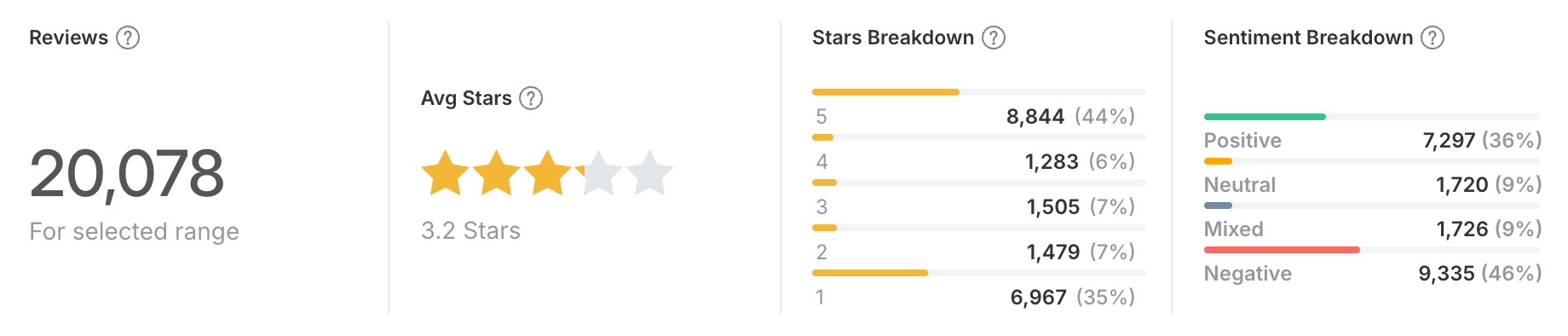
Rank by rating-weighted volume, not raw frequency. A phrase appearing in 200 reviews at 4.5 stars average is a feature people like. The same phrase at 1.4 stars is your next sprint.
The most common word in your reviews is usually "app". Frequency on its own is close to meaningless. Always cross volume with star rating and sentiment before you decide anything.
Work in phrases, not single words
Single words strip out the information you need. Start at the word level to spot what changed, then move to phrases to understand it.
"Login" could be praise for a new SSO flow or a wall of complaints about a broken session. "Login keeps failing" is unambiguous. Two, three and four-word phrases carry the intent that single terms lose.
Read the raw reviews behind any topic before you act
Before you take a topic to your team, read ten of the reviews inside it. Aggregates tell you where to look, not what is happening.
No classifier is perfect, and a topic that looks like a performance problem sometimes turns out to be three users on one old device. Reading the reviews underneath is what catches that.
It is also where you find the verbatim quote that makes the case internally. A single sentence from a real user moves a roadmap discussion further than a bar chart does.
Build custom topics for your own vocabulary
Automatic topics cover the universal categories. Custom topics cover everything specific to you: feature names, competitor names, release versions.
No general model knows your feature names, your competitors, or what your users call the thing you shipped last month.
Build them for each major feature, each competitor you care about, pricing and billing language, and any term your support team hears constantly. Write down what each one is meant to capture, so the numbers stay comparable when someone else picks up the analysis.
Segment by app version
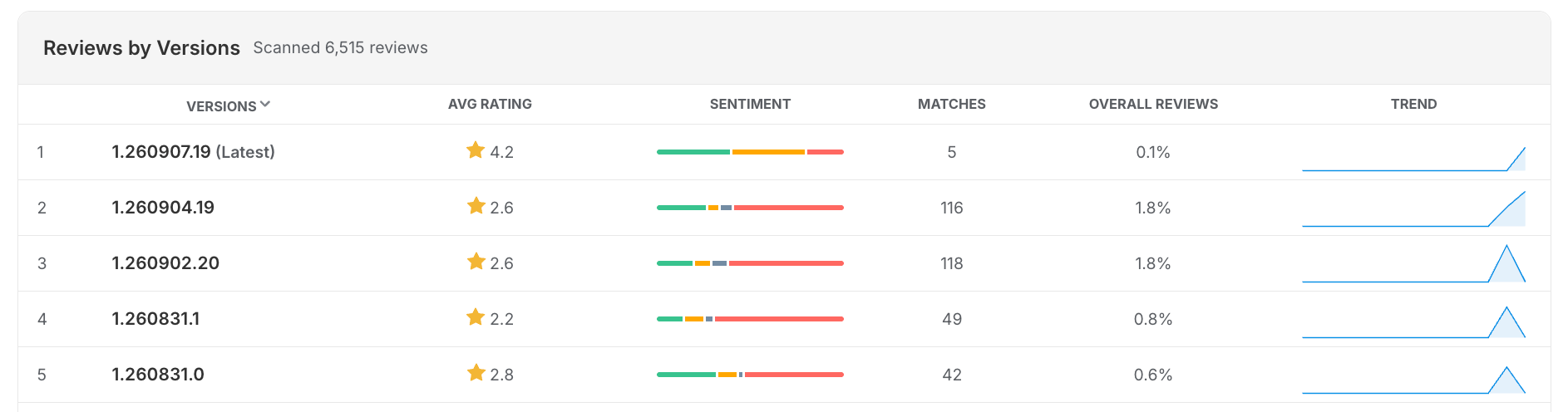
Filter topics and sentiment by release and you can see exactly which version introduced a complaint and which one resolved it.
This is the fastest way to make analysis actionable. Version tracking ties every review to the build it was written about, so the comparison is a filter rather than a spreadsheet. It also tells you whether that redesign your team argued about for six weeks landed or backfired.
Segment by store and country too
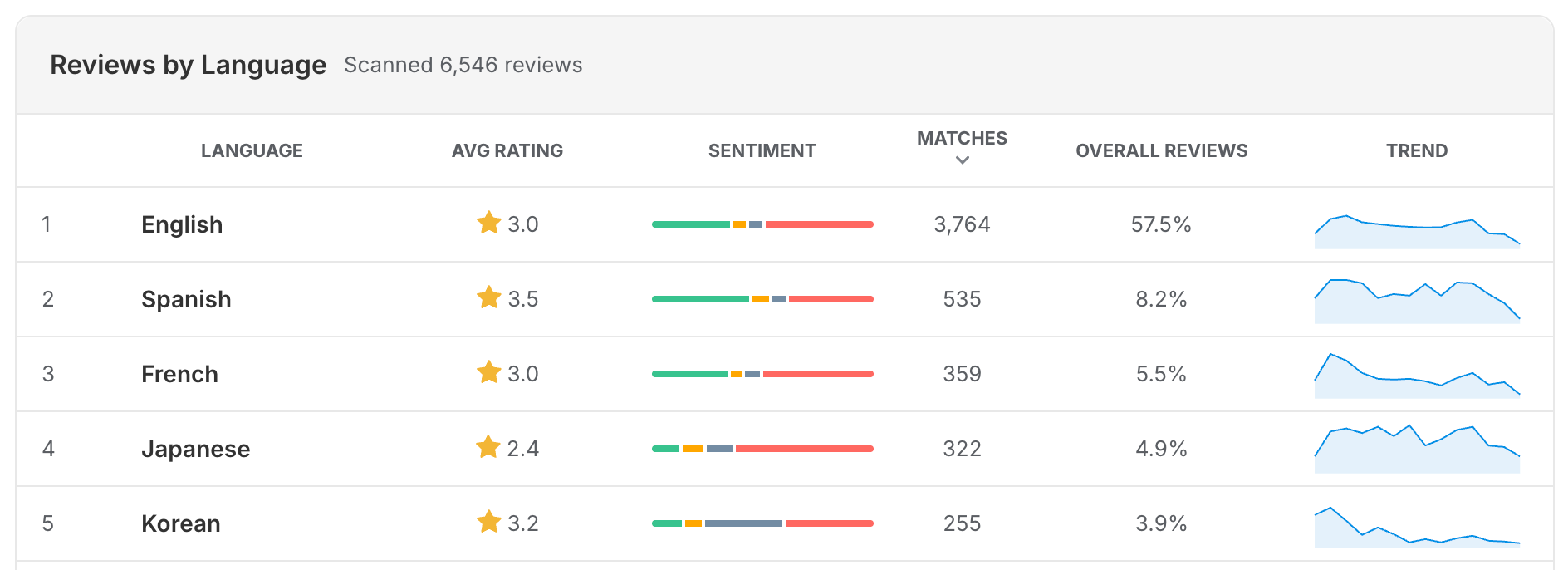
iOS and Android users complain about different things, and aggregating the two hides both. The same is true across your biggest markets.
A crash confined to one platform disappears into a combined view. So does a payment or pricing complaint that only affects one region. Pull reviews from every store and country into one place first, then filter down.
Worth knowing before you start: the stores expose this differently. Apple gives you both the country and the language of each review. Google Play gives you the language only, with no country. That is a permanent structural difference in what the stores publish, not a gap in any tool, so build your segments around what each store actually provides.
Compare against a baseline
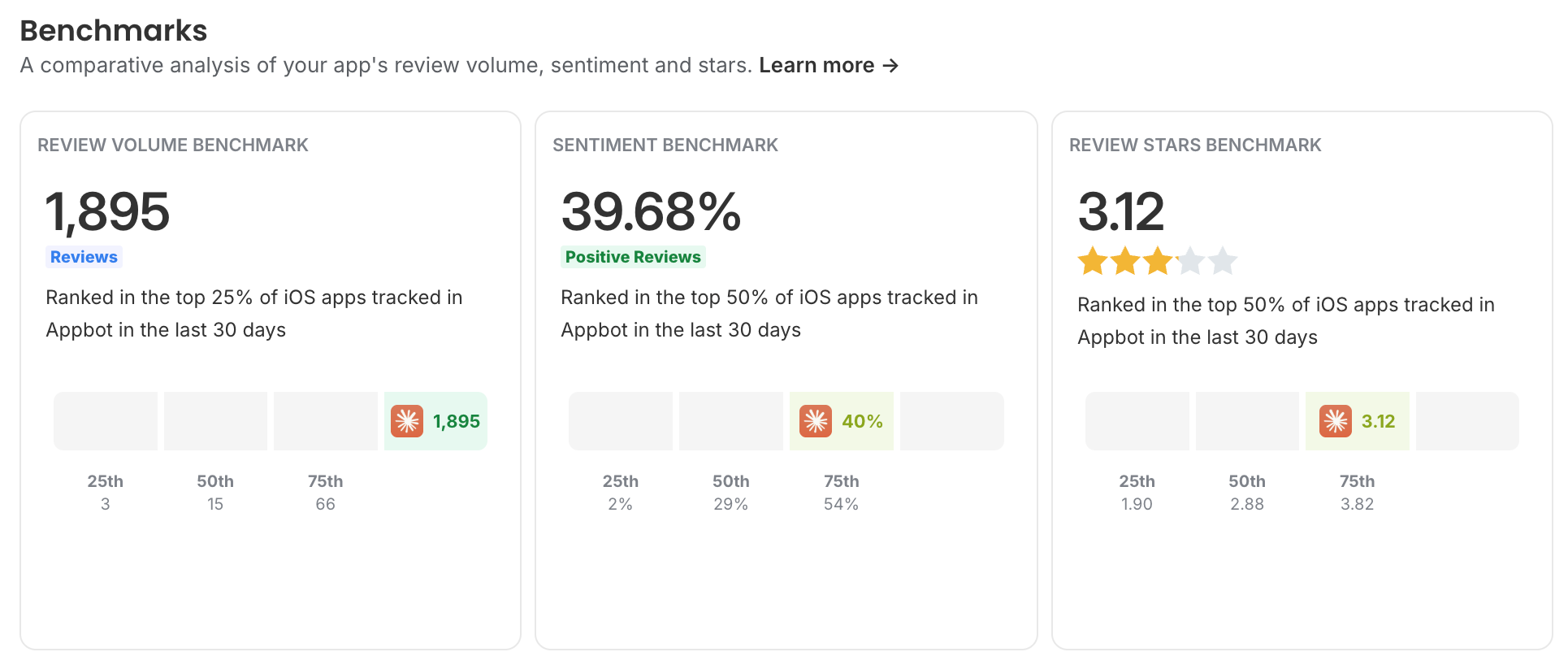
A number in isolation means nothing. Twelve percent of reviews mentioning bugs might be excellent or alarming depending on last month and on your category.
Use two baselines: your own history week over week, and competitor apps in the same category. Competitor tracking exists because "is 4.2 stars good" is only answerable relative to the alternatives your users are choosing between.
Analyze in the original language, translate for reading
Classify in the original language and translate separately for humans to read. Translation flattens exactly the signals sentiment analysis depends on.
Sarcasm, intensity and idiom are the first things lost in translation. Appbot works this way by default, so accuracy holds up on non-English feedback instead of degrading with every pass.
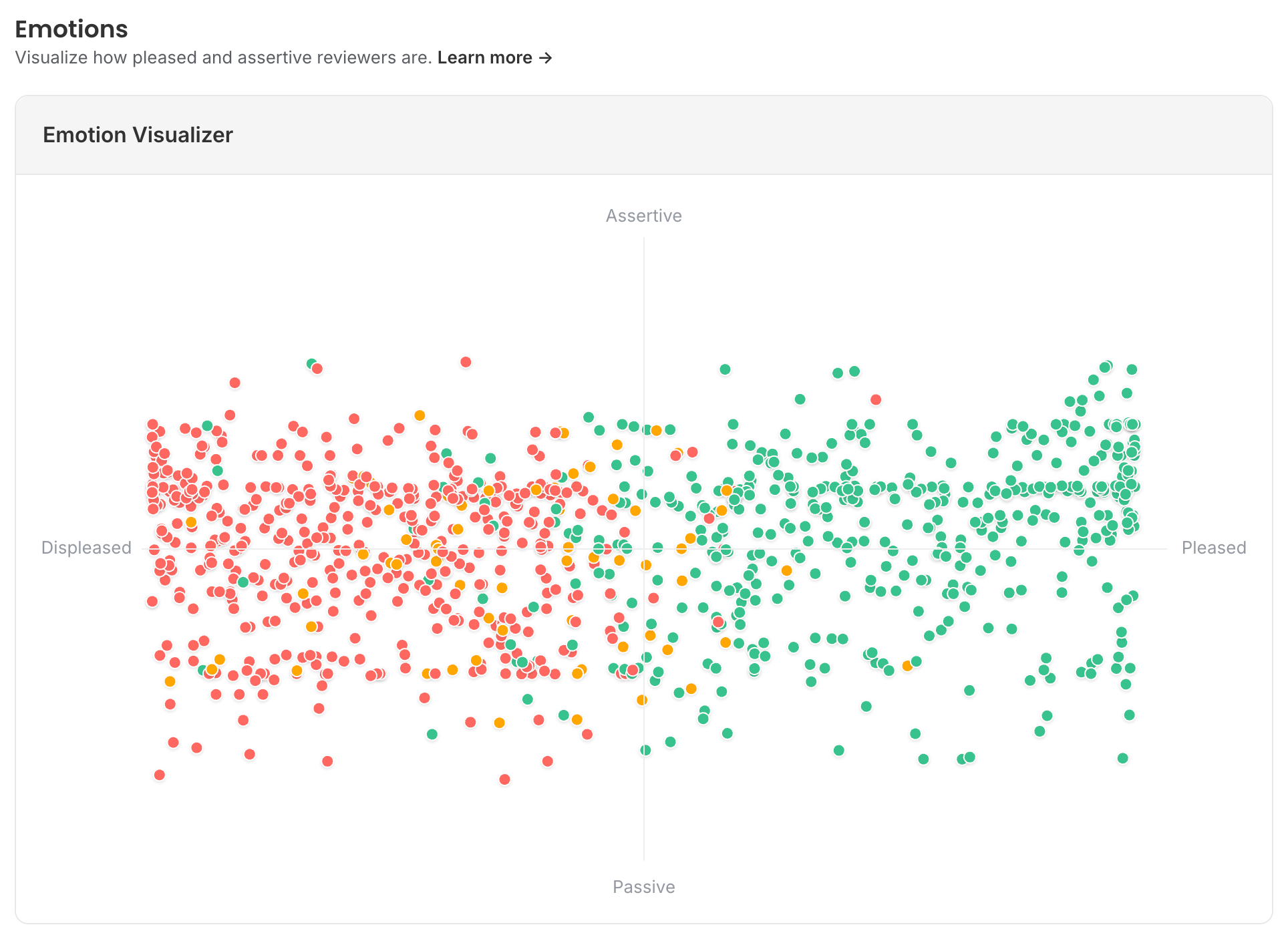
Use emotion to decide what to fix first
Sentiment tells you a topic is going badly. Emotion tells you why, and that changes who fixes it.
Confusion points at onboarding, documentation or UI copy. Frustration points at a bug or a performance problem. Two topics with identical negative sentiment can need completely different teams. For a worked example, see what 40,000 Finch reviews reveal about emotional attachment and loyalty.
Watch the direction of change, not the absolute number
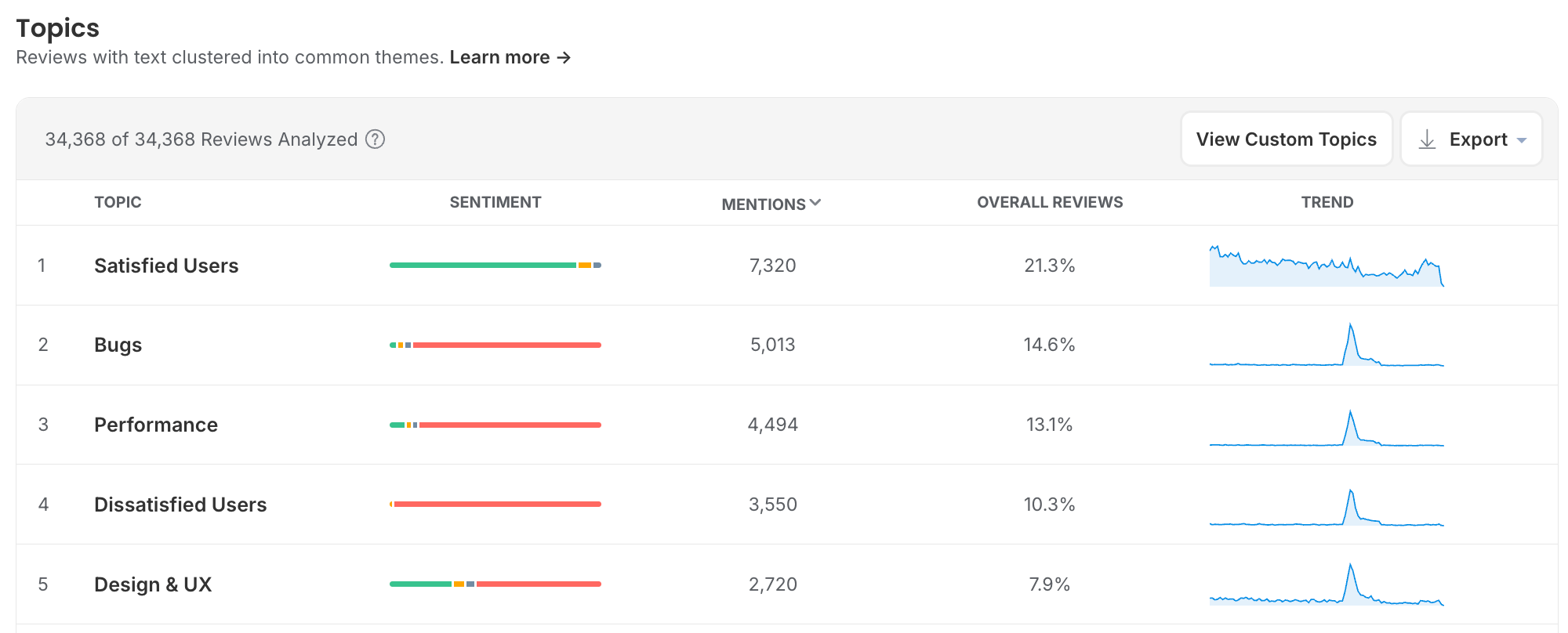
The valuable signal is nearly always a delta. A topic doubling week over week is worth investigating even at low volume, because it usually means something broke recently.
Set up alerts on the topics that would hurt most, rather than reviewing everything on a monthly cadence.
Route findings to the people who can act
Analysis that lives in a dashboard one person opens is analysis that changes nothing.
Send bug topics to engineering in Slack or straight into Jira. Send negative sentiment spikes to support. Put the topic and rating trend in a scheduled dashboard that lands in stakeholders' inboxes without anyone remembering to build it.
For the questions that come up between reports, Appbot MCP puts your classified review history inside Claude, ChatGPT and any MCP-compatible tool your team already uses, so "what changed since 4.2" gets answered where the work is happening.
Close the loop and check the numbers moved
When you ship a fix, confirm the topic volume actually dropped and the sentiment actually turned. Sometimes it does not, which means you fixed the wrong thing.
This is also what makes the case for the work internally. "Complaints about checkout fell 60% after 4.3" is a stronger argument than "users seem happier."
Do the same after a run of review replies. Replying is one of the few levers that moves a rating without a release.
Where review analysis goes wrong
Judging by word cloud
Word clouds give a fast impression and are useless for anything you need to measure. Two words at wildly different volumes can look nearly identical in size. Use them to present, not to decide.
Chasing the loudest topic instead of the most damaging
The highest-volume complaint is not always the one costing you stars. Weight by the star rating attached to it, and by how many users the affected flow touches.
Using a general-purpose sentiment model
App reviews are short, full of emoji, abbreviations, sarcasm and all-caps frustration. "OMG THIS CRASHED AGAIN 🔥" reads as negative to any human and gets missed by models trained on news articles or general web text. If a tool cannot tell you its accuracy on app reviews specifically, assume it is low.
Only looking when something goes wrong
Analysis run reactively after a bad week gives you no baseline to compare against. The value compounds when it is continuous.
Setting up custom topics and never revisiting them
Your product changes, your competitors change, and your users' vocabulary changes. A custom topic built around a feature you deprecated is quietly reporting zero and looking like good news.
Confusing reviews with ratings, or reviews with users
Most people who rate your app never write a review, and review sentiment skews more negative than your rating. Text analysis covers reviews only, so never present a topic's review volume as a share of your user base. See the difference between ratings and reviews for why the two numbers never match.
How Appbot makes this manageable
- Every review, automatically classified by sentiment, topic and emotion as it arrives, at 93%+ accuracy on app review text.
- Words, phrases and topic analysis across both stores, every country and every language you ship in.
- Custom topics with keyword logic, so your own vocabulary is measured as consistently as the standard categories.
- Ask Appbot answers questions in plain language, grounded in your own structured review history. "What are people complaining about since 4.2" returns an answer, not a chart to interpret.
- Appbot MCP brings the same review intelligence into Claude, ChatGPT and any MCP-compatible tool your team already uses.
- Full review history on signup, backfilled from launch, so trend analysis works from day one.
See what your reviews are actually about
Appbot classifies every review by topic, sentiment and emotion automatically, across both stores and every language you ship in.
Start your free trial →Frequently asked questions
What is app review text analysis?
The automated process of extracting themes, keywords and sentiment from app review text, so you can see what thousands of reviews are about without reading them individually. Also called text mining, text analytics or review NLP.
What is the difference between sentiment and emotion?
Sentiment classifies a review as positive, negative, mixed or neutral. Emotion identifies the specific feeling behind it, such as frustration, confusion, delight or loyalty. Sentiment tells you a topic is going badly, emotion tells you what kind of problem it is.
How is this different from asking ChatGPT or Claude to read my reviews?
A general model can summarise a batch of reviews you paste in. It cannot classify your full history consistently, hold a baseline to compare against, or tell you its accuracy on app review text specifically. Appbot MCP gives you both: a structured, consistently classified review history, queried from inside the AI tool you already use. More on why generic AI is not enough for app reviews.
What is the difference between topics and custom topics?
Topics are the standard themes every app has, like Bugs, Performance and Pricing, classified the same way across all apps so you can benchmark. Custom topics are yours: feature names, competitor names, release versions, defined with keyword logic.
Do I need a data scientist to analyze app reviews?
No. Purpose-built tools classify reviews automatically with no modelling, tagging or training required. Setup takes minutes rather than a project.
How many reviews do you need before analysis is useful?
Topic and sentiment analysis works at any volume, but patterns become reliable in the hundreds. Below a few dozen reviews a week, reading them all is still the better option.
How often should I look at it?
Weekly for topic and sentiment direction, immediately after every release, and by alert for the topics that would hurt most. Monthly reporting alone is too slow to catch a regression while it is still cheap to fix.
Can text analysis handle non-English reviews?
Yes, and it should classify them in their original language rather than translating first, because translation flattens the tone that sentiment analysis depends on. Translation is for humans reading the review, not for the model.
Can I track categories specific to my product?
Yes. Custom topics let you define your own categories with keyword logic, covering feature names, competitor mentions, release versions or any term your team cares about.
Does analyzing reviews help improve your rating?
Indirectly, and substantially. Analysis tells you which problems are costing you stars so you can fix the right things first, and which reviews to prioritize for a reply. Replying to a negative review can lift that rating by an average of +0.7, according to Google's Play Console documentation.
Where to from here?
About The Author

Stuart is Co-founder & Co-CEO of Appbot. Stuart has been involved in mobile as a developer, blogger and entrepreneur since the early days of the App Store. He built the 7 Minute Workout app in one night and blogged the story of growing the app to 2.3 million downloads before exiting to a large fitness device company. Previously he was the co-founder of the Discovr series of applications which achieved over 4 million downloads. You can connect with him on LinkedIn.