
How to Manage Your App's Reputation: 5 Best Practices
In this guide:
- What is app reputation management?
- App reputation management vs. online reputation management
- The 6 app reputation metrics that matter
- 5 best practices for managing your app's reputation
- 5 common app reputation management mistakes
- Choosing an app reputation management tool
- How Appbot makes this manageable
- Frequently asked questions
Run this playbook in one tool
Appbot monitors, analyzes and replies to App Store and Google Play reviews, with AI built on 400M+ app reviews.
Start your free 14-day trial →Key takeaways
- Monitor every store and country in one place, and route each review to the team that can act on it.
- Track ratings and reviews separately. Only about 1 in 37 people who rate an app write a review.
- Diagnose with sentiment, topics and country or language before reading. Sentiment usually moves before your star rating does.
- Reply to every review that deserves one, fix the cause, then tell the reviewer.
- Ask happy users at the right moment with the official prompts, never incentivize or gate, and mark every change on your rating chart.
What is app reputation management?
App reputation management is the ongoing work of shaping what users see when they find your app in a store: your star rating, the reviews on your listing, and your replies to them.
Your rating does two jobs. It's a conversion signal: a drop from 4.5 to 3.9 stars changes how many people tap install. And it's a discovery signal. Apple's App Store search documentation says ratings and reviews "can influence how your app ranks in App Store search", and Google's Play Console guidance says your rating "plays a role in determining your success on Google Play".
The teams that keep their rating healthy treat it as a process rather than a number they check when something goes wrong. The process covers five jobs:
- Monitoring ratings and reviews across every store and country.
- Analysis of what reviews are actually about, using sentiment and topics.
- Response to reviews, especially negative ones, at scale.
- Rating prompts that ask satisfied users for a rating at the right moment.
- Reporting that shows whether the work is moving your rating.
App reputation management vs. online reputation management
Search "reputation management software" and most results are built for restaurants, clinics and retail chains. They pull Google Business Profile, Yelp and Facebook reviews. Others are social listening tools that track mentions on X, Reddit and news sites.
Those are useful jobs. They're just not the job most app teams have. If your reviews arrive in the App Store and Google Play, you need a tool built around those stores: their reply APIs, their country-by-country ratings, and the slang, emoji and bug reports that fill app reviews.
| App reputation management | Online reputation management | |
|---|---|---|
| Main sources | App Store, Google Play, Microsoft Store | Google Business Profile, Yelp, social, news |
| Who owns it | Product, support, ASO and growth teams | Marketing, PR and location managers |
| Core metric | Star rating and review sentiment by version | Brand mentions and local review scores |
| Typical issues | Bugs, crashes, billing, missing features | Service quality, staff, PR incidents |
| Replies | Through each store's developer reply tools | Through each review site or social platform |
Rule of thumb: buy for the place your reviews actually arrive. If 80% of your feedback is in the app stores, start with an app-specific tool and add social listening later if you need it.
The 6 app reputation metrics that matter
Your star rating is the headline number for your app store reputation, but on its own it doesn't tell you why it's moving. These six metrics together show what's actually happening.
1. Average star rating
The average rating shown on your listing in each store. It's the number users see before they install. Google Play weights recent ratings more heavily, so a bad release can pull the number down quickly and a good one can lift it. Apple's average is cumulative across every version unless you choose to reset it when you ship a new one, so a bad patch lingers for longer. Track it by store and country, with releases marked, so you can tie changes to what you shipped. Appbot's rating trends do this by app version automatically.
2. Sentiment trend
The share of positive, negative and neutral reviews over time. Because reviews carry the reasons and arrive faster than the ratings that set your average, sentiment usually moves before your star rating does. That makes it your early warning system. Sentiment analysis classifies every review as it arrives. See the Disney+ example below for what a sentiment shift looks like in practice.
3. Topic share of negative reviews
What percentage of 1 and 2-star reviews mention bugs, billing, login, performance or a specific feature. This turns "people are unhappy" into "login broke on Android in 8.4". Topics and Words & Phrases give you this breakdown without reading every review.
4. Reply rate and time to reply
How many reviews get a response, and how fast. Prioritize negative reviews about fixable issues, where a reply can turn a 1-star into an updated rating. Google's Play Console documentation states that responding to a negative review can increase that rating by an average of +0.7 stars, and that apps which reply tend to have higher overall ratings. The bar is low: in Appbot's analysis of close to a billion Google Play reviews, just over 11% received a reply, rising to about 18% for 1 and 2-star reviews. Of the reviews that did get a reply, half were answered within 24 hours. Answering the negative reviews on your current version within a day puts you ahead of most of your category.
5. Rating and review volume
How many ratings and how many written reviews arrive each day, tracked separately. A jump in reviews, especially negative ones, signals a release issue, an outage or a review bomb, and usually lands before sentiment or the star rating catch up. A jump in ratings with no matching rise in reviews points to something else: a new prompt, a featuring spot, a marketing push, or a rating bomb from users who never write. Watching both tells you whether a moving average is backed by reasons you can act on.
6. Rating vs. competitors
Your rating and sentiment against the apps users compare you to. A 4.3 is great in a category averaging 3.9 and a problem in one averaging 4.7. Competitor analysis puts those apps on the same chart as yours.
5 best practices for managing your app's reputation
Monitor every store, every country, in one place
Pull all reviews and ratings together, continuously, so nobody has to go looking.
Store consoles show one app, one store and one country at a time, and nobody checks them every day. Bring every review from the App Store, Google Play and any other stores you're in together, then route the right reviews to the right team in Slack, Microsoft Teams or your CRM like Zendesk or Freshdesk. Engineering sees crash reports, support sees billing complaints, and marketing sees the praise.
Track ratings and reviews as two different datasets
A rating is a star score with no text. A review is a star score with a reason attached. Almost all of the number on your listing comes from people who never told you why.
36.6
Ratings for every written review.Appbot's analysis of 432 million ratings and 11.8 million reviews over 12 months found that only one user in 37 who rates an app writes anything.
That ratio is why the star rating and the reviews can move in opposite directions. The rating is set mostly by people who gave no reason, and it clusters between 4 and 5 stars. The reviews are where the reasons live, and they skew lower and spread more evenly. A prompt campaign can lift the rating while the reviews get angrier, and a bug can fill the reviews with complaints days before enough ratings arrive to move the average. Monitor both, and know which one you're looking at.
Diagnose with sentiment, topics and country or language before you read
Classify every review by sentiment, topic and emotion, then watch for changes.
When negative sentiment spikes, the topic breakdown tells you why before you've read a single review. Compare this week's negative topics with last week's, and split them by country or language and version. Apple tags each review with its storefront country. Google Play only shares the reviewer's language, so on Android, language is your proxy for region. A topic that doubles its share of 1-star reviews is your problem, even if the overall rating hasn't moved yet.
Worked example: Disney+ on iOS, September 2026
From May to August 2026, Disney+ received between 1,090 and 1,360 written App Store reviews a month in Appbot's dataset, averaging about 1.9 stars with 78% to 82% negative sentiment. Unhappy, but stable.
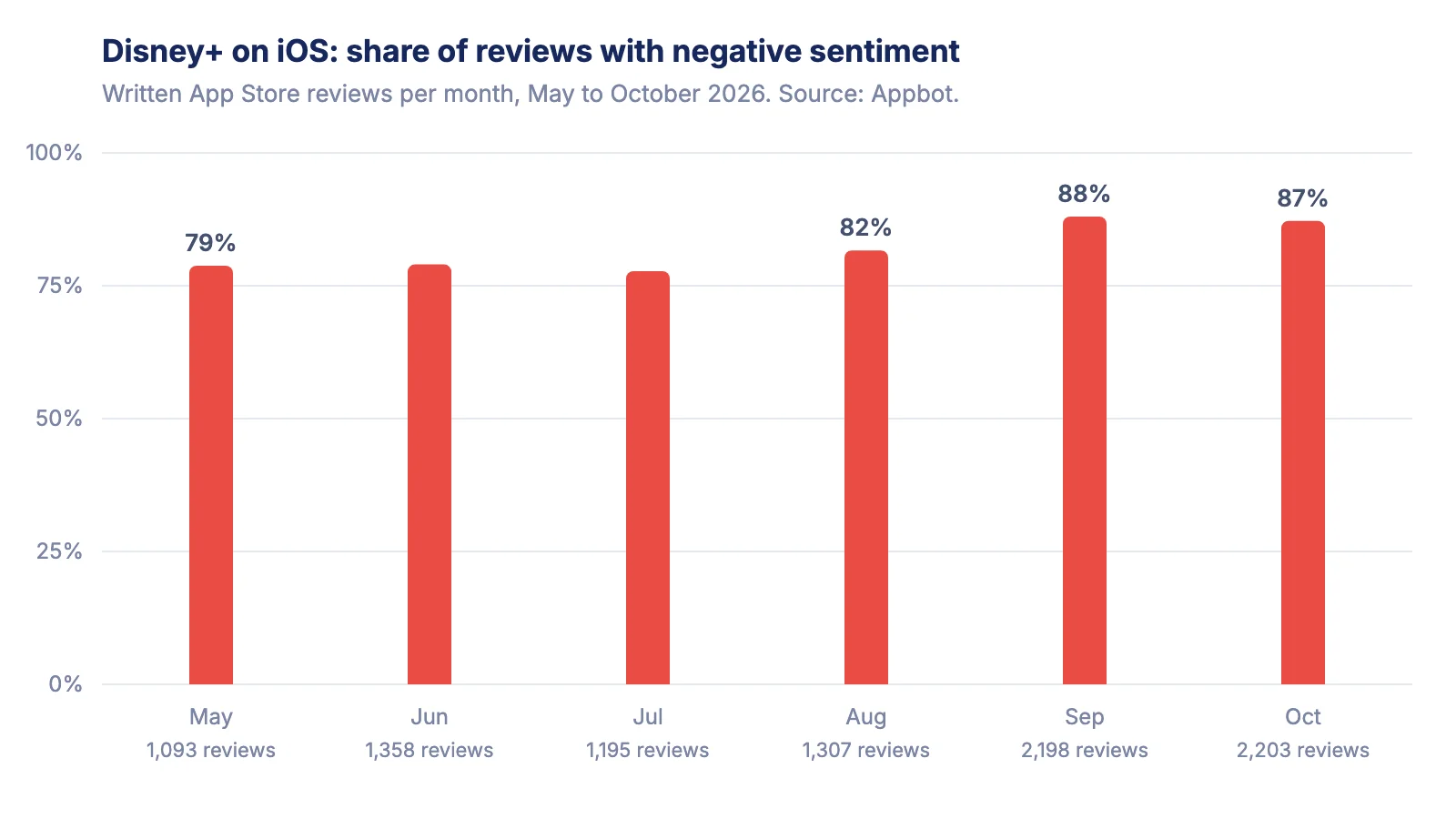
In September, volume jumped to 2,198, negative sentiment rose to 88% and the average fell to 1.57 stars. The topic breakdown showed why. Negative reviews mentioning login went from 34 in August to 247 in September, and two-thirds of them came from Indonesia, a country that produced none of August's. South Africa and Thailand were next, and reviews in Indonesian and Thai went from 19 to 407 in a month. The reviews described being moved to a new app and then being unable to sign in with an existing subscription.
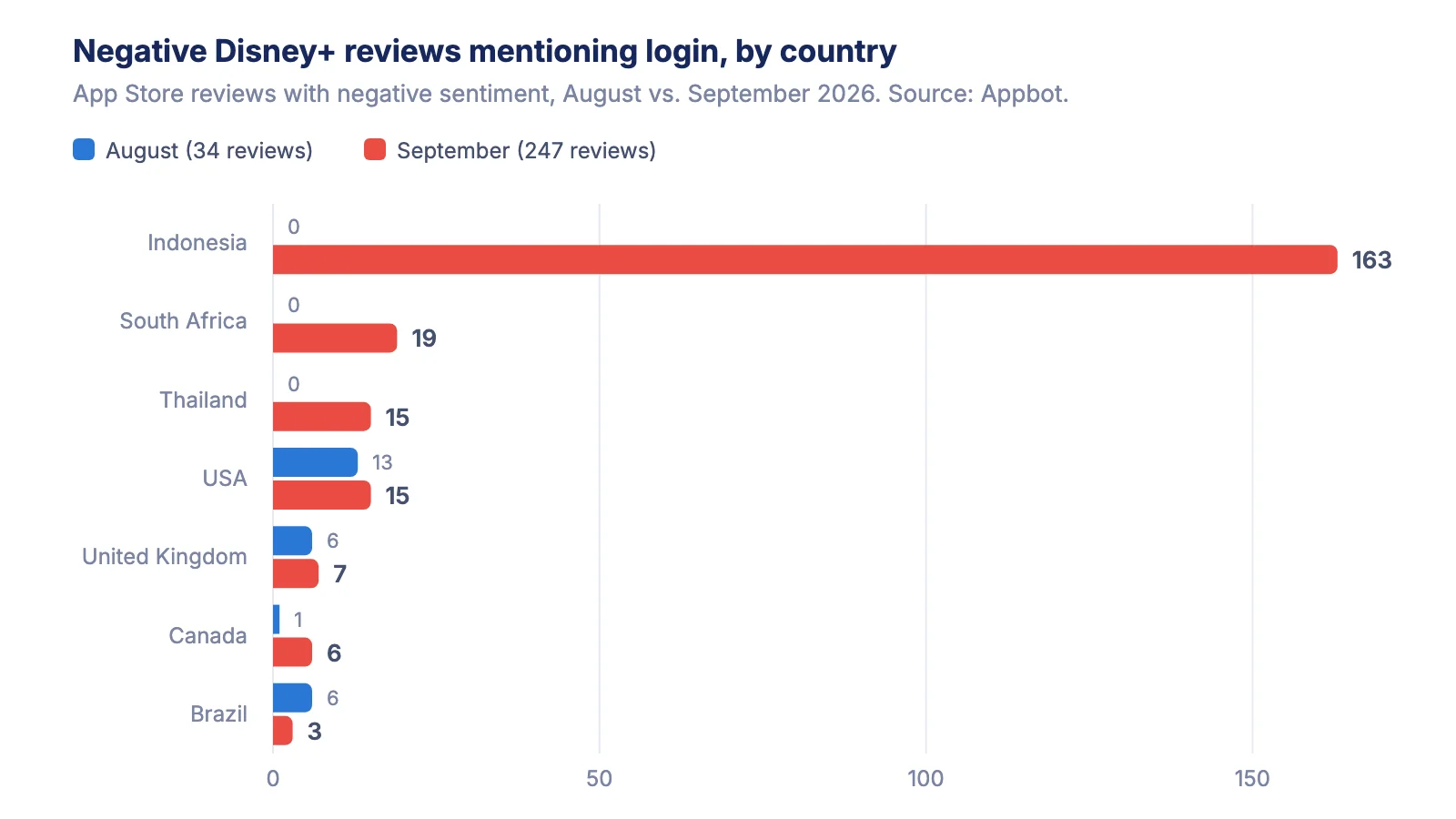
Why it matters: the global average said "worse". Sentiment, topics and country said "login, Indonesia, since the first week of September". That is the difference between a fortnight of guessing and a ticket for the right engineering team on day two.
Data: Appbot analysis of public App Store reviews, May to October 2026.
Reply to every review, then fix the cause and tell them
Every reply is public. Prospective users read them before they install, and reviewers can update their rating after you respond.
Replies matter for two audiences. For the reviewer, a reply is the only signal that anyone read what they wrote. For everyone else, your replies show whether there's an active team behind the app. An unanswered 1-star review reads as confirmed, while a calm, specific reply shows a path to a fix. That goes for the good reviews too: thanking someone who took the time to write a thoughtful 5-star review, or answering a question or feature request, is visible to the next person deciding whether to install.
When a review points to a real problem, don't stop at the reply. Send bug clusters to engineering and billing complaints to support, and once the fix ships, go back to the people who complained and tell them. Both stores let users edit their review after a developer responds, and Google's own data puts a number on it: responding to a negative review lifts that rating by an average of +0.7 stars. Replying to older complaints after you ship the fix is one of the highest-return rating activities available.
Doing this for every review that deserves one takes tooling. AI Replies draft a personalized response for each review in your tone, canned replies cover the questions you answer every day, and rule-based automation handles the cases you've decided don't need a human. Keep a human on anything sensitive. Acknowledge the specific point, say what's happening about it, and keep the tone level even when the review isn't. For the full approach, see our guide to replying to app store reviews.
Ask happy users at the right moment, then prove it worked
Prompt for ratings at positive moments, stay inside both stores' policies, and mark what you changed on your rating chart.
Ask for a rating after a completed task, a successful sync or a milestone reached, never on first launch or in the middle of a flow. Use the official prompts: Apple's in-app rating prompt can show at most three times in 365 days per user, and Google Play's In-App Review API also limits how often it appears, so each user only gets a few chances. Custom pop-ups that mimic the store prompt are the fastest way to a guidelines problem.
Two things to avoid:
- Incentives and fake reviews. Discounts, in-app currency, unlocks or contest entries in exchange for a rating breach both stores' rules, as do bought or exchanged reviews. The rating you earn this way disappears the moment the incentive does.
- Gating. Screening users with a satisfaction question and only sending happy ones to the store is a practice platform policies and consumer protection rules increasingly target. Ask everyone or ask no one. If you want a private channel for unhappy users, offer it alongside the prompt, not instead of it.
Then prove it worked. Mark releases, prompt changes and campaigns on your rating chart so you can show exactly what moved the number. That record is what turns reputation management from a cost into something you can report on.
Worked example: Habit Rabbit's rating recovery
Habit Rabbit, a gamified habit tracker, averaged 4.73 stars on iOS and 4.51 on Google Play in its 2021 launch year. The averages slid for four years, to 3.85 on iOS and 3.97 on Google Play in 2025. In 2026 both turned, reaching 4.05 and 4.18 through August.
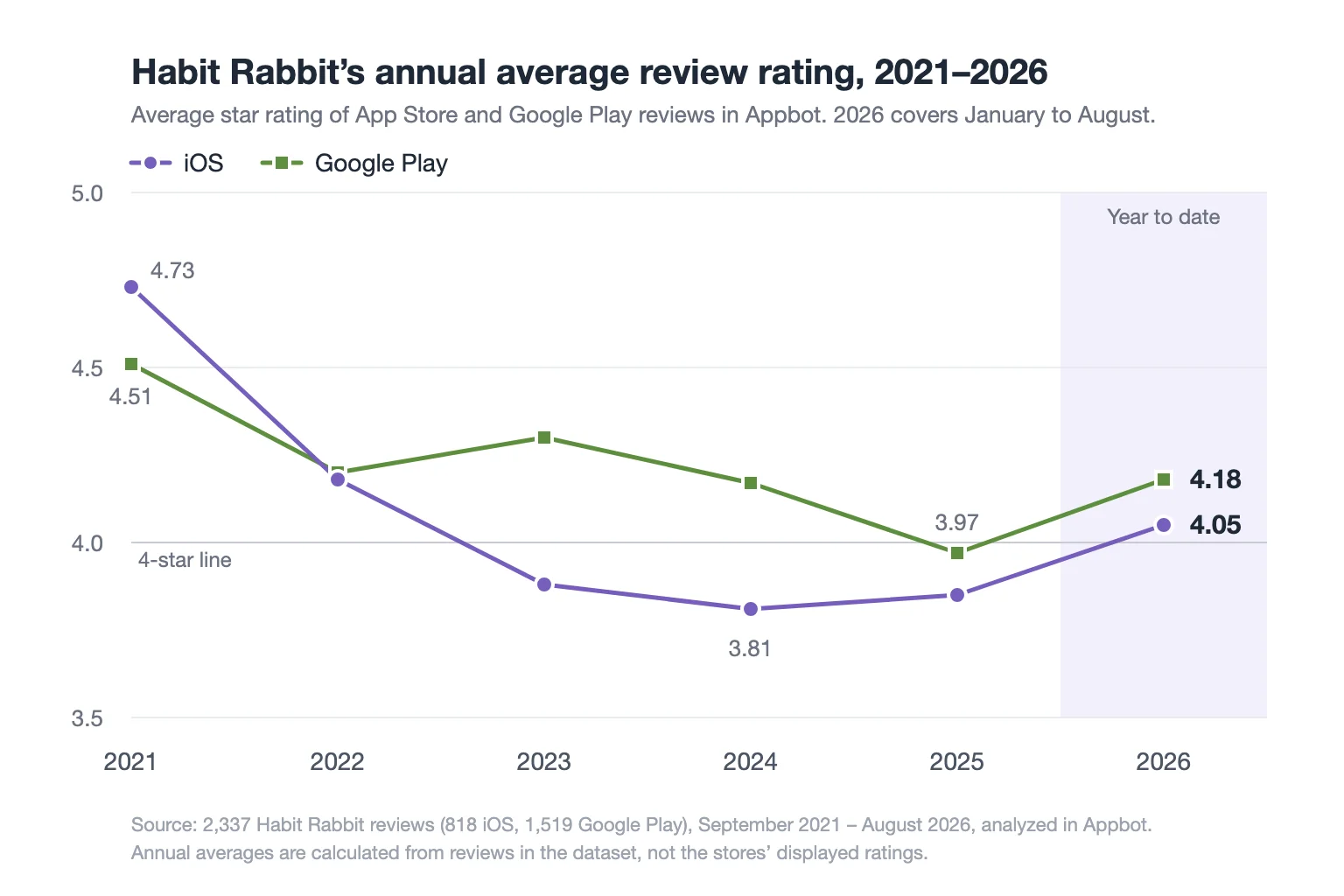
The reviews behind the chart show what changed. Across versions 5.02 to 5.05, ads were mentioned in 75% of negative and mixed iOS reviews. By version 5.12, that share was 42%, and pricing and paywall complaints had fallen from 19% to 4%. Review data can't prove those changes caused the recovery, but splitting the complaints by version is what let the team see which issues receded and which took their place: freezing, login problems and, new in 2026, too many review prompts.
Why it matters: a rating that goes up is good news. A rating that goes up with the releases marked and the complaint mix tracked is a report you can put in front of leadership. Read the full Habit Rabbit analysis.
Data: Appbot analysis of 2,337 public App Store and Google Play reviews, September 2021 to August 2026.
Run this playbook in one tool
Appbot monitors, analyzes and replies to App Store and Google Play reviews, with AI built on 400M+ app reviews.
Start your free 14-day trial →5 common app reputation management mistakes
- Watching only the overall average and missing what's happening by country, language, version or topic.
- Replying only to 1-star reviews, or pasting the same line into every reply.
- Prompting for a rating on first launch or in the middle of a task.
- Offering rewards for ratings, or only sending happy users to the store.
- Ignoring fake or abusive reviews instead of reporting them. Apple's Report a Concern option in App Store Connect and the Play Console's report option both exist for reviews that break store rules, and the reviewer isn't notified.
Choosing an app reputation management tool
You can run this playbook with spreadsheets and the store consoles for one app. Past that, a tool saves hours every week. Whichever you pick, check for five things:
- Built for the app stores. Continuous fetching from the App Store and Google Play, every country, with in-store replies.
- Analysis trained on app reviews, in every language.Generic sentiment models struggle with emoji, slang and sarcasm, and get worse again on translated text. Ask how accurate the tool is on app reviews specifically, whether it analyzes reviews in their original language, and whether it translates them so your team can read and reply.
- Replies at scale. AI drafts, canned replies and rule-based automation, ideally unlimited rather than charged per reply.
- Routing. Reviews sent to Slack, Microsoft Teams or your CRM like Zendesk or Freshdesk.
- Proof of impact. Rating and sentiment trends over time, with releases marked, so you can show what moved the number.
For a side-by-side look at how Appbot, AppFollow, AppTweak, Appfigures and others compare, read The Best App Review Management Tools in 2026.
How Appbot makes this manageable
Appbot covers all five. Review monitoring pulls App Store, Google Play and Microsoft Store reviews and ratings into one place, from every country, continuously. Sentiment analysis and Topics, trained on 400M+ app reviews, work in the original language across 200+ languages, with in-line translation to English so your team can read and reply. Replies with AI drafts, canned responses and rule-based automation post to the store from Appbot, and integrations send reviews to Slack, Teams, Zendesk and the other tools your team already uses.
Rating trends by store, country and app version, plus competitor analysis, show whether the work is moving the number. And when you want the short answer, Ask Appbot and the Appbot MCP answer plain-language questions like "why did our rating drop this week?" in Appbot or in AI tools like Claude and ChatGPT.
Frequently asked questions
What is app reputation management?
App reputation management is the ongoing work of monitoring, understanding and improving how users rate and review your app on the App Store, Google Play and other stores. It covers tracking your star rating, analyzing what reviews say, replying to users, prompting happy users to rate, and catching problems before they reach your rating.
What are the best online reputation management tips for an app?
For an app, online reputation management mostly happens in the app stores. Five tips: monitor every store and country in one place; track ratings and reviews separately; use sentiment and topics to find what's driving negative reviews; reply, fix the cause and tell the reviewer; and ask happy users for a rating at the right moment using the official prompts.
What is the difference between app reputation management and online reputation management?
Online reputation management covers everything said about a brand, including Google reviews, social media, news and search results. App reputation management focuses on app store ratings and reviews, which directly affect store visibility, conversion and installs. Most app teams need app store coverage first.
What should I look for in app reputation management software?
Look for a tool built around the app stores, with accurate sentiment and topic analysis trained on app reviews, analysis and translation of reviews in every language, fast replies with AI drafts and automation, integrations with your CRM and chat tools, and rating trends you can tie to releases. Check whether replies and AI features are unlimited or metered. Compare the main tools.
Does replying to app reviews improve your rating?
Yes. Google's Play Console documentation states that responding to a negative review can increase that rating by an average of +0.7 stars, and that apps which reply tend to have higher overall ratings. Both the App Store and Google Play let reviewers edit their rating after a developer responds, and replies are public, so they also show prospective users that the team is listening.
Can I pay or reward users for positive app reviews?
No. Apple and Google both prohibit manipulating ratings, including incentivized reviews, and only showing rating prompts to users you expect to be happy is a risky practice. Ask for ratings at natural, positive moments, and use the official in-app review prompts.
How do I know if my app's reputation is getting worse?
Watch your average star rating in each store, and track negative sentiment and topic volume week over week. A rise in 1-star reviews mentioning a specific topic, like login or billing, usually shows up days before your star rating moves.
Can you remove negative app reviews?
Not directly. Neither Apple nor Google lets developers delete reviews. You can report a review that breaks store rules, such as spam, offensive content or a review about a different app, and the store decides whether to remove it. For genuine complaints, the route is to fix the problem, reply, and give the user a reason to update their rating. On the App Store you can also reset your summary rating when you release a new version, which resets the rating but not the written reviews.
What is a good app store rating?
Ratings cluster between 4 and 5 stars on both stores, so anything under 4.0 stands out to users. The useful benchmark is your category and direct competitors rather than the store as a whole. A 4.3 is strong in a category averaging 3.9 and weak in one averaging 4.7.
How often should I check my app's ratings and reviews?
Daily for new reviews, weekly for sentiment and topic trends, and after every release for a focused check on the new version. Automate the daily part by routing reviews to Slack, Teams or your CRM, so the weekly review is about trends rather than triage.