
How to Improve Your Mobile Game's Rating: 10 Best Practices
Mobile games get rated and reviewed differently from most other apps. Players write a lot, write angrily, and write fast after an update. This guide covers how to work through both your ratings and your reviews so they produce decisions rather than anxiety.In this guide:
- Why game ratings behave differently
- 10 best practices for improving your mobile game's rating
- Start with your last release
- How Appbot helps games teams
- Frequently asked questions
Know within hours whether a patch landed
Appbot pulls your App Store, Google Play and Microsoft Store ratings and reviews into one place, sorts and counts them by topic and sentiment automatically, and tracks all of it by app version.
Start your free 14-day trial →Why game ratings behave differently
A single balance change can produce a week of one-star ratings from people who have played for two years and love the game. A live game ships more often than most apps, and every release lands on players who have opinions about the last one.
That volatility is a problem if you only watch the star average. It is an advantage if you read what is underneath it, because your players will tell you exactly which change caused the drop, usually within hours.
10 best practices for improving your mobile game's rating
Understand that ratings and reviews are two different datasets
A rating is a star score with no text. A review is a star score with written feedback attached. Almost all of the number on your listing comes from people who never told you why.
36.6
Ratings for every written review. Across nearly 4,000 apps of every category in Appbot's own analysis, the sample received 36.6 ratings for each review with text attached.
That ratio is why the distinction matters so much in games, where the in-app prompt does most of the work and casual titles see the widest gap of all.
The consequences are worth being precise about:
- Your written reviews explain the sentiment, but they are a small slice of the number. Each review's star score does count toward your summary rating. It is just outnumbered many times over by ratings with no text, so the reviews cannot move the average on their own.
- The two can move in opposite directions. A prompt campaign can lift your star average while your written reviews get angrier, because prompts reach satisfied players who would never have posted unprompted.
- Any tool showing you review text is showing you a subset. Volume, average and distribution come from ratings. Cause comes from reviews. You need both, and you need to know which one you are looking at.
Both stores also show a rating specific to the viewer's country, Apple by territory and Google Play since late 2021, so a global average can hide a single market falling apart. The same is true across stores, and across the two datasets. Super Mario Run shows it twice over:
| Super Mario Run | Public store rating | Written reviews average | Written reviews negative |
|---|---|---|---|
| App Store (US) | 3.8 stars from 78,000 ratings | 2.30 stars | 67% |
| Google Play | 3.7 stars from 1.67 million ratings | 3.46 stars | 34% |
Same game, same top complaint, four different numbers depending on which dataset and which store you look at. Roll them into one figure and you lose the only view that tells you where to look.
Separate the four things players are actually complaining about
Negative game reviews almost always fall into one of four buckets, and they need completely different responses.
| Bucket | What it covers | What it really is |
|---|---|---|
| Technical | Crashes, load times, battery drain, lost progress, devices that cannot keep up | Bugs. The most fixable and the most damaging, because progress loss in particular generates ratings that never get revised |
| Balance and progression | Difficulty spikes, grind, a level that walls a large share of players, a nerf that invalidated someone's build | Design feedback with a clear location attached. "Level 47" appearing repeatedly is a map pin, not an opinion |
| Monetisation | Paywalls, ad frequency, ad placement mid-run, prices, loot box odds, pay-to-win perception | Where reviews and revenue argue with each other, and where you most need volume data rather than the loudest review |
| Live service and community | Server downtime, matchmaking quality, cheaters, event scheduling, support response | Often not the game team's problem to fix, always the game's rating to pay for |
Sorting reviews into these four before you read them changes what you see. A rating drop that looks catastrophic is often three technical bugs and one loud balance argument.
Worked example: a pricing decision from almost a decade ago
Super Mario Run launched in December 2016 with a free first world and a one-off unlock for the rest of the game. Almost a decade later, that decision is still the single biggest driver of its negative reviews.
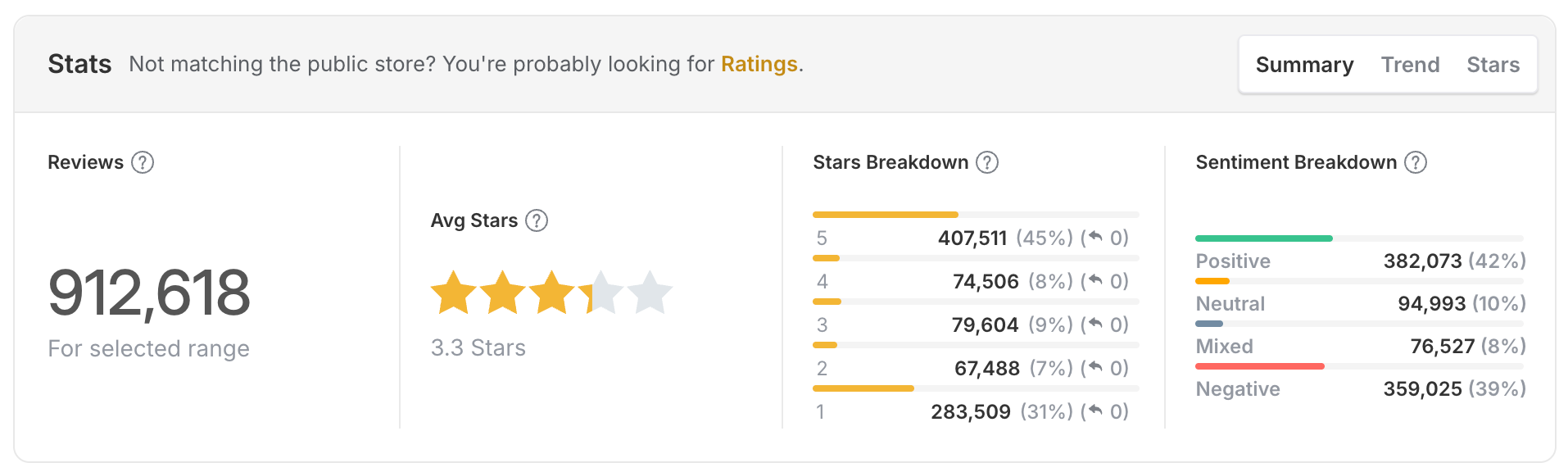
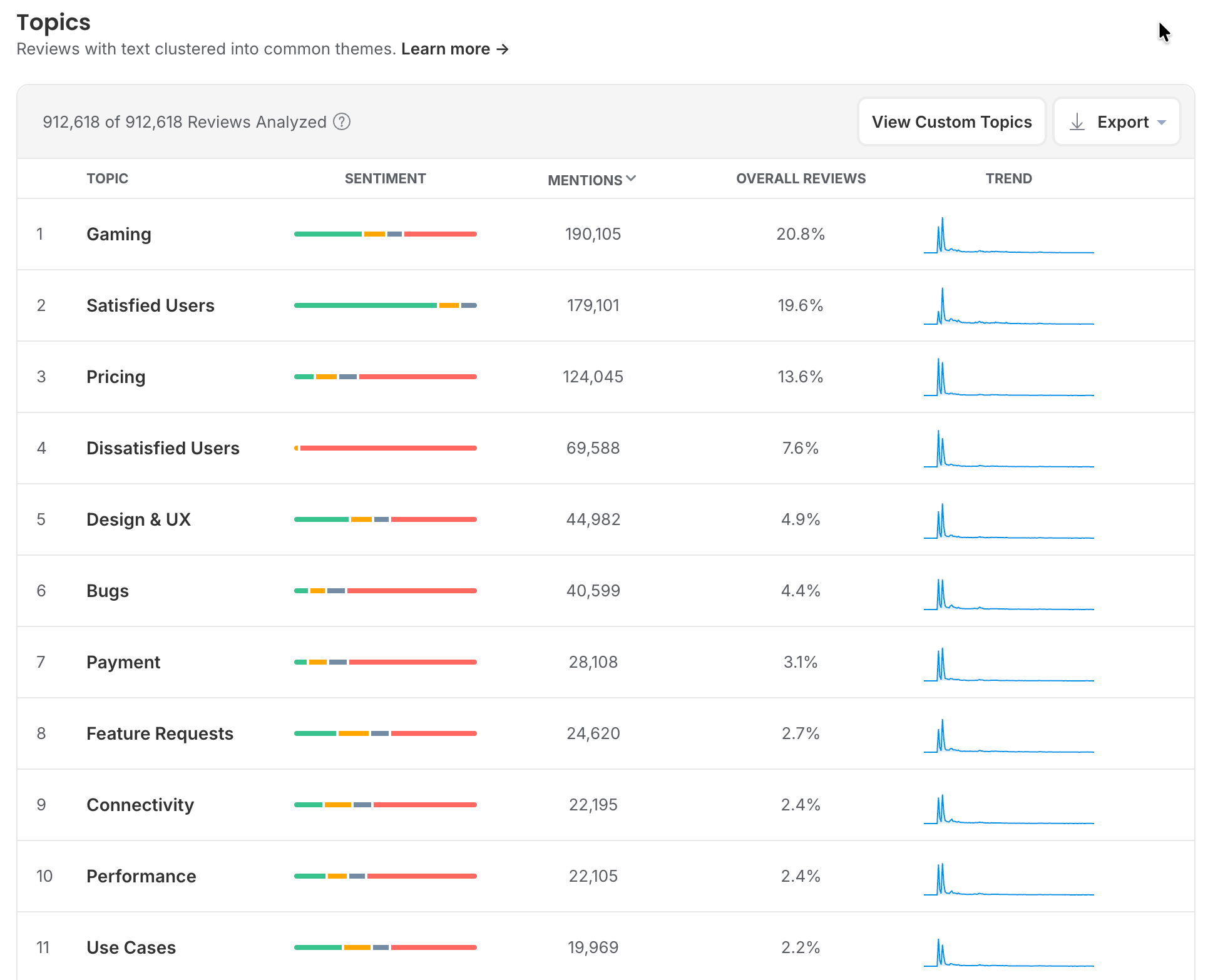
Of the 912,618 written reviews the game has received across both stores, 124,045 are tagged Pricing. That is 13.6% of everything, three times the size of Bugs, and the sentiment bar is almost entirely red. Filter to recent one and two-star reviews and pricing is still the top substantive topic tagged.
Nothing is broken. No patch fixes it. Every one of those reviews is a player who understood the model, disliked it, and rated accordingly.
Why it matters for your game: the monetisation bucket is the one teams most often treat as somebody else's problem, because engineering cannot close it and the reviews read as opinion rather than defect. It is still the largest single source of one-star ratings in many games, and the only way to argue about it usefully is with a count.
Read the extremes first, in the right order
Start with one and two-star reviews filtered to the last update. Then read the five-star reviews most teams skip.
The low ratings are where the actionable detail lives. Players reporting a break tend to describe exactly what they were doing when it happened.
Five-star reviews tell you which mechanics are load-bearing. Knowing what players praise unprompted tells you what you must not touch in the next patch, and that is worth as much as a bug list.
Three-star reviews are the most underrated of the lot. They are usually written by engaged players who like the game and have one specific, articulate objection. They read like feedback rather than venting.
Turn recurring complaints into counted topics
The difference between "players hate the new ads" and a count such as "ad frequency mentions are up 340% since 2.4, and 71% of them are negative" is the difference between an argument and a decision.
Group reviews automatically by the terms your players actually use: the feature names, the level numbers, the enemy names, your currency's name, the competitor they keep comparing you to. Gaming vocabulary is unusually consistent, which makes it unusually easy to track with custom topics.
Worth tracking as standing topics for most games:
- Each monetisation surface by name
- Ads, separately from in-app purchases
- Your most recent two or three content releases
- Progress loss, save corruption, account recovery
- Matchmaking and cheating, if you are competitive multiplayer
The Help Centre has a short guide to building custom topics that stay accurate as the game changes.
Prioritise by volume and trajectory, not by outrage
A complaint mentioned in 300 reviews and climbing beats a complaint mentioned in 12 and falling, however brutally the 12 were written.
Every backlog conversation includes someone quoting one devastating review from memory. Review counts settle that. Two questions to ask about any issue before it goes in the sprint:
- Is it growing or decaying? Post-update rage decays within days. Structural problems do not. Wait 72 hours before treating a spike as a trend, and set an alert on the topics that would hurt most so you are not relying on someone noticing.
- Is it correlated with a version? If mentions start the day 2.4 shipped, you have your cause and probably your fix. Once it is in the sprint, send the reviews to Jira or Slack with the ticket rather than pasting quotes.
Ask for ratings properly
Because ratings drive the number on your store listing, when you ask is a product decision, not a marketing one. The stores deliberately limit how often you get to ask.
Apple's StoreKit prompt can be shown to a player a maximum of three times in a 365-day period, and Apple decides whether to show it at all when you request it. Google's In-App Review API works under similar constraints. You get very few chances, so spend them well. Our guide to prompting for reviews on iOS and Android covers the mechanics. For games specifically:
- Prompt after a win, never after a loss. A completed level, a boss beaten, a streak extended, a reward collected. Asking immediately after a defeat, a failed purchase or a crash recovery is how you manufacture one-star ratings.
- Do not prompt during the tutorial. Players who have not yet decided whether they like the game will tell you so.
- Never incentivise. Offering currency, items or unlocks in exchange for a rating breaches both stores' guidelines and puts your listing at risk.
- Re-time the prompt after every major release. The moment that felt like a win in 2.1 may not exist in 2.4.
You cannot detect whether the prompt was actually displayed, so measure this at the population level: rating volume per day before and after a prompt change.
Reply, and reply where it counts
Prioritise replies to one and two-star technical reports over everything else. Those are the players most likely to revise upward, and the ones whose problem you can actually solve.
Replying visibly moves ratings in games, because players frequently update a review after a developer response, particularly on a technical complaint that later gets fixed. Google's own Play Console ratings page says responding to a negative review can increase that review's rating by an average of +0.7 stars. That is a per-review figure, not an app-wide lift, and it is still the best-evidenced lever a live game has.
97%
Share of Google Play reviews that go unanswered, according to Appbot's own data. Replying is still an uncrowded field.
Look back at the stats panel in step 3. The reply column reads zero in every star band, against 283,509 one-star reviews. That is the 97% in practice.
Say what broke, say it is fixed or being fixed, and name the version. Skip the apology template. Game players can smell it. If volume is the problem, AI Replies drafts in your voice from the review itself, so each reply still names the actual bug.
Going back to reply to older technical complaints after you ship the fix is one of the highest-return rating activities available to a live game, and almost nobody does it. Neither store puts an age limit on replies. For the full playbook, see how to reply to app store reviews.
Know exactly what a rating reset does before anyone suggests it
Apple lets you reset your summary rating when you release a new version. It is the nuclear option.
What it does: clears your cumulative star rating across all territories at once, and shows a note on your product page saying the rating was recently reset. Your written reviews stay exactly where they are.
What it costs: the previous rating is gone permanently, and until enough players rate the new version you are presenting a game with almost no ratings, which is its own conversion problem. Apple recommends using it sparingly.
When it is defensible: a genuine relaunch, or a rating so buried by a resolved catastrophe that no realistic volume of new ratings could move the average. Not a bad quarter, and not a patch that went badly.
Google Play offers no equivalent, so on Android the only route back is volume.
Measure the patch, not the month
Tie both ratings and review sentiment to app version so each release gets a verdict. Monthly averages hide everything interesting.
A great patch and a broken one in the same month cancel each other out and you learn nothing. Version tracking gives each release its own numbers. What to look at after each one:
- Rating volume in the first 72 hours, which tells you how many people noticed
- Daily rating average, not your cumulative store average. The lifetime figure moves too slowly to tell you anything about a patch, especially on an established game with hundreds of thousands of ratings
- Review sentiment versus the previous version at the same point after launch
- Which topics appeared that were not there before
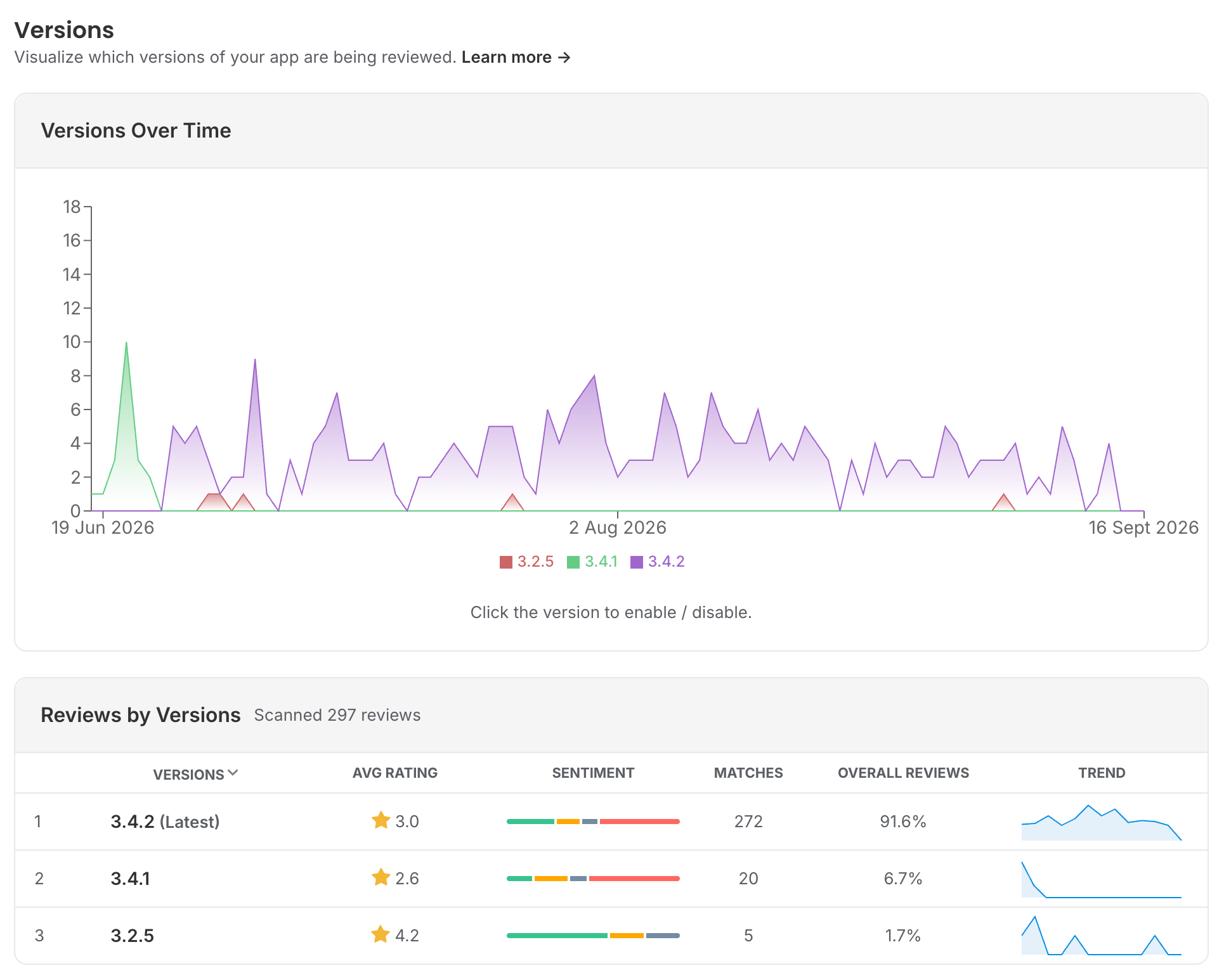
The comparison that matters is release-to-release at the same age, not this week versus last week. Bear in mind that Apple only publishes ratings as a cumulative snapshot, and the public listing on both stores shows a running total, so day-level rating movement has to be derived by tracking that snapshot over time. It is not something you can reconstruct after the fact.
Use what players praise
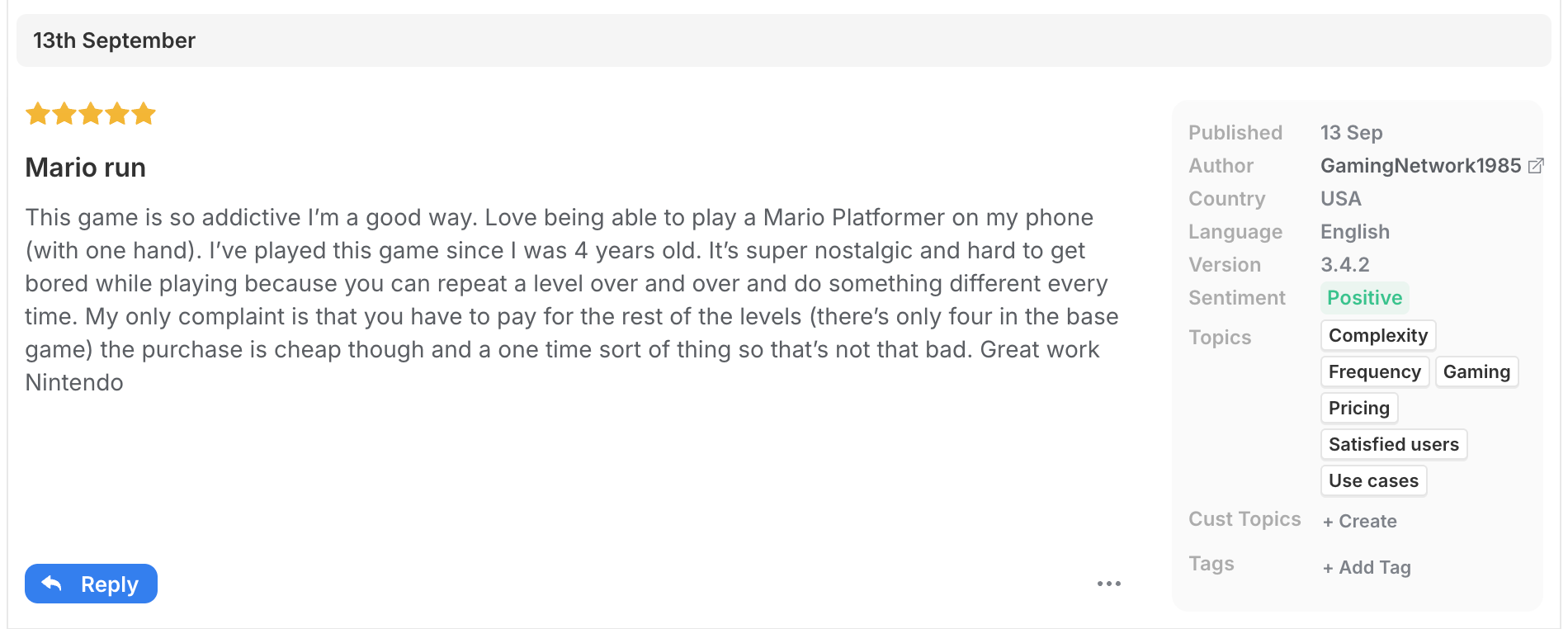
Your five-star reviews are marketing copy written by people with no incentive to flatter you.
Pull the recurring praise from your most common positive words and phrases into store listing copy, update notes and creative testing. It is already proven to resonate, because players volunteered it.
It is also roadmap validation. If a feature you considered minor is what players keep naming, that is a signal about where to invest next.
Start with your last release
If you do one thing after reading this: filter to one and two-star reviews from your most recent release, sort the complaints into the four buckets above, and count them. Most teams find at least one issue they had badly underestimated and one they had been overreacting to.
How Appbot helps games teams
- Ratings and reviews from every store, including the Microsoft Store, in one place, with your full review history backfilled from day one.
- Daily ratings snapshots from the moment you start, tracked by app version, so each patch gets its own verdict.
- Sentiment and topic analysis that runs automatically, plus custom topics for your own level names, currencies and monetisation surfaces.
- Replies from the same screen you triage in, so the fixed-it follow-up on an old technical complaint actually happens.
- Appbot MCP brings your classified review history into Claude, ChatGPT and any MCP-compatible tool your team already uses, so "what broke in 2.4" gets answered where the patch is being planned.
Know within hours whether a patch landed
Appbot pulls your App Store, Google Play and Microsoft Store ratings and reviews into one place, sorts and counts them by topic and sentiment automatically, and tracks all of it by app version.
Start your free 14-day trial →Frequently asked questions
What is the difference between a rating and a review?
A rating is a star score with no text. A review is a star score with written feedback attached. Every review's star score counts toward your summary rating, but reviews are a small minority of the ratings that make up that number. Most players who rate a game never write anything, so the number is mostly set by people who gave no reason, and your reviews are where the reasons live. The two can move in opposite directions. More in our analysis of ratings versus reviews.
How often can a mobile game ask players for a rating?
Apple's StoreKit prompt can be shown to a player a maximum of three times in a 365-day period, and Apple decides whether to display it when you request it. Google's In-App Review API works under similar quota limits. Offering currency, items or unlocks in exchange for a rating breaches both stores' guidelines.
Should I reset my game's App Store rating?
Only for a genuine relaunch, or when a resolved catastrophe has buried your rating so deeply that no realistic volume of new ratings could move it. Resetting clears your summary rating in every territory at once and permanently, and your listing shows almost no ratings until players rate the new version. Written reviews stay. Google Play has no equivalent.
How do I tell whether a patch improved my game's rating?
Compare the daily rating average, rating volume and review sentiment for the new version against the previous version at the same age. The cumulative store rating moves too slowly to show anything about a single release, and Apple only publishes it as a cumulative snapshot, so day-level movement has to be tracked as it happens.
Which reviews should a games team reply to first?
One and two-star technical reports on the current version. Those players are the most likely to revise their rating upward once the problem is fixed, and replying to older technical complaints after you ship the fix is one of the highest-return rating activities available to a live game.
Where to from here?
About The Author

Claire is the Co-founder & Co-CEO of Appbot. Claire has been a product manager and marketer of digital products, from mobile apps to e-commerce sites and SaaS products for the past 15 years. She's led marketing teams to build multi-million dollar revenues and is passionate about growth and conversion optimization. Claire loves to work directly with the world's top app companies delivering tools to help them improve their apps. You can connect with her on LinkedIn.