

Apple Just Raised User Expectations for App Accessibility: What It Means for Mobile App Teams
Published 25th May, 2026 by Stuart Hall
In this overview you'll learn:
- Apple Intelligence Is Changing Accessibility
- What Are Accessibility Features in Mobile Apps?
- Why Accessibility Matters for App Reviews
- Apple Is Raising the UX Baseline for Apps
- Accessibility Issues Often Hide in Review Data
- How App Teams Can Track Accessibility Feedback at Scale
- A Practical Mobile App Accessibility Playbook
- Better Accessibility Usually Means Better Apps
- Frequently Asked Questions about App Accessibility

Want to generate best-practice review replies in seconds?
Try Appbot AI Replies, free for 14 days →Apple Just Raised User Expectations for App Accessibility
Apple’s latest accessibility announcement is not just a platform update. It could significantly change how users evaluate mobile apps, particularly around usability, navigation, readability, captions, VoiceOver support, and overall app UX.
With new AI-powered accessibility features coming to iPhone, iPad, Mac, Apple Watch, and Vision Pro, Apple is redefining what users expect from app experiences.
According to Apple’s accessibility announcement, the company is expanding accessibility capabilities across VoiceOver, Voice Control, Magnifier, Accessibility Reader, Live Captions, and more using Apple Intelligence.
For app developers, designers, ASO managers, and product teams, that has direct implications for:
- App Store ratings.
- User retention.
- Onboarding UX.
- Customer satisfaction.
- Review sentiment.
- Accessibility compliance.
- Mobile app accessibility.
Because when Apple improves accessibility at the system level, users expect apps to keep up.
Apple Intelligence Is Changing Accessibility
This year’s accessibility updates are heavily powered by Apple Intelligence.
Some of the biggest changes include:
- Richer VoiceOver descriptions for images and interfaces.
- More natural Voice Control interactions.
- AI-powered Accessibility Reader summaries.
- Expanded Live Captions.
- Smarter Magnifier experiences.
- Improved Braille support.
- Eye-tracking wheelchair controls on Vision Pro.
These features do not happen in isolation. They directly affect how users interact with third-party apps.
For example:
- Voice Control depends on clearly labeled UI elements.
- VoiceOver works best with structured navigation and accessibility metadata.
- Accessibility Reader relies on readable, well-structured content.
- AI-generated descriptions become less useful when interfaces are cluttered or ambiguous.
In other words, Apple’s accessibility AI can improve app experiences, but it can also expose poor UX and accessibility gaps.
What Are Accessibility Features in Mobile Apps?
Accessibility features help people with visual, hearing, motor, cognitive, or speech impairments use mobile apps more effectively.
Common mobile app accessibility features include:
- Screen reader support.
- Voice navigation.
- Dynamic text sizing.
- Closed captions and transcripts.
- High contrast modes.
- Descriptive accessibility labels.
- Keyboard and switch navigation.
Many of these features improve usability for all users, not just users with disabilities.
For example, captions help users watching videos without sound, while larger text and improved readability benefit users across different devices and environments.
Why Accessibility Matters for App Reviews
Accessibility issues often surface directly in App Store and Google Play reviews.
Users may not explicitly say “this app has accessibility problems.” Instead, they leave reviews like:


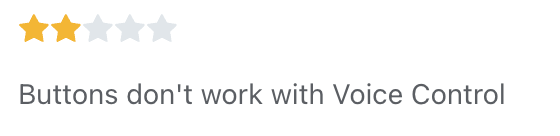
These reviews are often categorized internally as:
- UX complaints.
- Onboarding friction.
- Navigation confusion.
- Feature bugs.
- Performance frustration.
But accessibility is frequently the root cause.
For mobile product teams, this creates a major opportunity. App review analysis can help teams identify accessibility friction long before it turns into widespread churn, retention issues, or App Store rating decline.
Apple Is Raising the UX Baseline for Apps
Accessibility is increasingly becoming a core quality metric for app UX.
As Apple builds smarter accessibility into the operating system, user expectations rise across the entire app ecosystem.
Users increasingly expect apps to:
- Work smoothly with VoiceOver.
- Support dynamic text sizing.
- Function with voice navigation.
- Include captions and transcripts.
- Maintain readable contrast and layouts.
- Avoid gesture-only interactions.
- Clearly label buttons and actions.
Importantly, these improvements benefit far more than accessibility users alone.
Features like:
- Better readability.
- Clearer navigation.
- Structured content.
- Simplified interactions.
- Improved captions.
often improve overall mobile app usability for everyone.
Accessibility Issues Often Hide in Review Data
For many teams, accessibility problems remain invisible because they are scattered across thousands of app reviews.
A few examples product teams might uncover:
- Recurring complaints about unreadable dark mode text.
- Onboarding screens that break with larger font sizes.
- Navigation issues affecting screen reader users.
- Video caption frustrations.
- Inaccessible subscription flows.
- Unlabeled buttons after UI redesigns.
Individually, these reviews may seem minor.
Together, they reveal patterns that directly impact customer satisfaction, app retention, and App Store ratings.
This becomes even more important as AI-powered accessibility tools become more mainstream. Problems that previously affected niche workflows may suddenly impact broader user segments.
How App Teams Can Track Accessibility Feedback at Scale
As accessibility expectations increase, manually reading thousands of app reviews becomes unrealistic.
This is where review categorization and sentiment analysis become essential.
With Topics and Custom Topics, teams can automatically group accessibility-related feedback across App Store and Google Play reviews.
For example, teams could create Custom Topics for:
- VoiceOver.
- Captions.
- Navigation.
- Readability.
- Font size.
- Screen reader issues.
- Accessibility bugs.
- Onboarding friction.
Combined with sentiment analysis and advanced filters, product teams can quickly identify:
- Rising frustration after a release.
- Negative sentiment tied to accessibility regressions.
- Recurring UX problems affecting assistive technologies.
- Accessibility complaints impacting ratings and retention.
Instead of accessibility feedback getting buried inside general UX complaints, teams can proactively monitor trends and prioritize fixes based on real customer impact.
A Practical Mobile App Accessibility Playbook
Monitor Accessibility Review Trends
Track recurring accessibility-related themes in App Store and Google Play reviews.
Look for patterns involving:
- VoiceOver usability.
- Readability.
- Navigation.
- Captions.
- Screen reader compatibility.
- Dynamic text support.
Test Accessibility During Product Development
Accessibility testing should be part of regular QA and product workflows, not just a final compliance check.
Teams should regularly test:
- Onboarding flows.
- Subscription screens.
- Navigation systems.
- Forms and inputs.
- Media playback experiences.
using VoiceOver, dynamic text sizing, captions, and other accessibility tools.
Use Review Data to Prioritize Accessibility Fixes
Not all accessibility issues have the same business impact.
Using review monitoring, sentiment analysis, and Custom Topics can help teams identify emerging accessibility issues before they escalate into broader customer experience problems.
This makes it easier to prioritize fixes affecting:
- Core user flows.
- Retention.
- Ratings.
- Subscription conversion.
- Customer satisfaction.
Better Accessibility Usually Means Better Apps
Apple clearly sees accessibility as part of the future of intelligent user experiences. For app teams, this is not just about accessibility compliance. It is about building mobile apps that:
- Work better.
- Retain users longer.
- Reduce frustration.
- Improve App Store ratings.
- Deliver more inclusive experiences.
- Create better overall app UX.
And increasingly, the fastest way to identify accessibility friction is by listening carefully to what users are already saying in app reviews.
Frequently Asked Questions about App Accessibility
What Is Mobile App Accessibility?
Mobile app accessibility refers to designing and developing apps that can be used by people with visual, hearing, motor, cognitive, or speech impairments. Common accessibility features include screen reader support, VoiceOver compatibility, captions, dynamic text sizing, voice navigation, and accessible UI labels.
Why Is App Accessibility Important?
App accessibility improves usability, customer satisfaction, retention, and App Store ratings. Many accessibility improvements, such as better readability and clearer navigation, improve the overall app experience for all users, not just users with disabilities.
How Do Accessibility Issues Affect App Reviews?
Accessibility problems often appear in app reviews as complaints about navigation, readability, captions, VoiceOver support, onboarding friction, or unusable interfaces after app updates. Repeated accessibility complaints can negatively impact app ratings, retention, and customer satisfaction.
What Accessibility Features Did Apple Announce?
Apple announced several new AI-powered accessibility features, including richer VoiceOver descriptions, Accessibility Reader, expanded Live Captions, improved Voice Control, Magnifier enhancements, Braille improvements, and new accessibility experiences powered by Apple Intelligence.
How Can Mobile App Teams Improve Accessibility?
Mobile app teams can improve accessibility by testing apps with VoiceOver and screen readers, supporting dynamic text sizing, improving captions and transcripts, using descriptive accessibility labels, and monitoring customer feedback for recurring accessibility complaints.
How Can App Reviews Help Identify Accessibility Problems?
App reviews often reveal accessibility issues before they appear in analytics or support tickets. Monitoring recurring complaints about navigation, readability, captions, or screen reader compatibility can help teams identify accessibility friction and prioritize fixes faster.
How Can Appbot Help Track Accessibility Feedback?
Appbot helps teams monitor accessibility-related feedback using Topics, Custom Topics, sentiment analysis, and advanced filters. These tools make it easier to identify recurring accessibility complaints across App Store and Google Play reviews and track trends over time.
Does Accessibility Impact App Store Rankings?
Accessibility can indirectly impact App Store rankings by affecting app ratings, retention, engagement, and review sentiment. Poor accessibility experiences may lead to negative reviews and lower customer satisfaction, which can influence app performance over time.
Want to generate best-practice review replies in seconds?
Try Appbot AI Replies, free for 14 days →Where to from here?
- Discover effective strategies for app review management to efficiently handle and leverage user feedback.
- Unlock valuable insights into user sentiment with our powerful sentiment analysis tool for informed decision-making.
- Simplify your review tracking process with our efficient review aggregator, providing a centralized view of user feedback.
- Engage with your users effectively by crafting thoughtful responses with our convenient Reply to App Store Reviews feature.
About The Author

Stuart is Co-founder & Co-CEO of Appbot. Stuart has been involved in mobile as a developer, blogger and entrepreneur since the early days of the App Store. He built the 7 Minute Workout app in one night and blogged the story of growing the app to 2.3 million downloads before exiting to a large fitness device company. Previously he was the co-founder of the Discovr series of applications which achieved over 4 million downloads. You can connect with him on LinkedIn.
Enjoying the read? You may also like these
 The New Era of App Discovery: What App Growth Teams Need to Know About ASO, SEO & AI
 App discovery is changing. Learn how ASO, SEO, and AI now work as one system—and how app copy, reviews, and release notes drive discovery.
Learn how Apple’s new Retention Messaging API helps reduce app subscription churn with personalized, in-the-moment messages. Backed by research, this guide shows how to combine App Store feedback, discounts, and smart messaging to boost retention.
A complete guide to App Store product page optimization in 2026 — custom product pages, A/B testing, and metadata that converts more installs.
What the new Apple and Google age-verification requirements mean for your app, and which APIs to use to comply without hurting the user experience.