

Liquid Glass Is Coming to Every iOS App: What User Feedback on Past Redesigns Can Teach Product Teams
Published 9th June, 2026 by Claire McGregor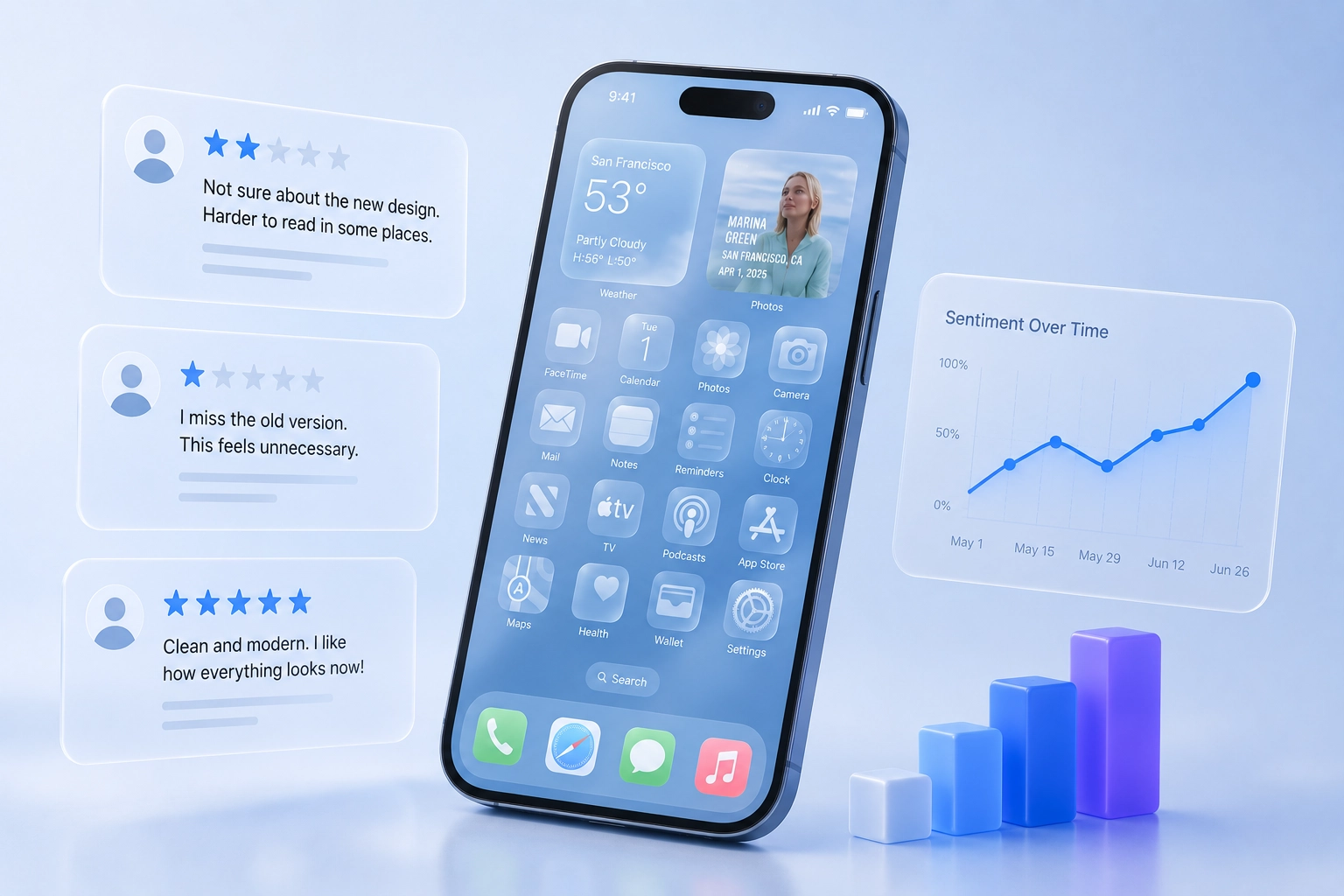
Apple's Liquid Glass design language is set to become one of the biggest visual changes to the iPhone experience in years.
As developers begin adopting the new design system across their apps, many product teams are asking the same question:
How will users react?
If history is any guide, the answer is surprisingly predictable.
In this overview you'll learn:
- Users Hate Change. Until They Don't.
- The Three Types of Feedback Product Teams Should Expect
- Apple's Response Shows Why Feedback Matters
- What Review Data Can Tell You
- The Opportunity Hidden Inside Design Changes
- Liquid Glass Will Test Product Teams, Not Just Designers
- Final Thoughts
- Frequently Asked Questions: Apple's Liquid Glass in 2026

Want to generate best-practice review replies in seconds?
Try Appbot AI Replies, free for 14 days →Major interface changes almost always trigger a wave of negative feedback, even when users eventually come to prefer the new design. From Apple's iOS 7 redesign to Instagram's logo change and Microsoft's Ribbon interface, user reactions tend to follow familiar patterns.
For product teams, understanding these patterns can help separate temporary resistance from genuine usability problems.
Users Hate Change. Until They Don't.
One of the most consistent findings in product design is that users become attached to familiar interfaces.
Researchers call this the mere-exposure effect: people tend to prefer things they've seen repeatedly. When a product changes, users lose that familiarity and often perceive the new experience as worse, even when usability remains unchanged.
This phenomenon has appeared repeatedly throughout technology history.
When Apple launched iOS 7 in 2013, it replaced the skeuomorphic design language that had defined the iPhone for years with a dramatically flatter visual style. User reviews were flooded with complaints about readability, icons, and the overall aesthetic.
Yet within months, the controversy faded. Today, many users barely remember what pre-iOS 7 looked like.
The same pattern appeared when Facebook redesigned News Feed, when Instagram changed its iconic camera logo, and when Gmail introduced conversation threading.
Initial backlash was loud. Long-term adoption was nearly universal.
The Three Types of Feedback Product Teams Should Expect
When Liquid Glass begins appearing across apps, product teams should expect feedback to fall into three categories.
1. "I Hate It Because It's Different"
This is the most common reaction.
Users often describe a redesign as confusing, ugly, or unnecessary simply because it differs from what they already know.
These reviews tend to focus on emotional responses:
- "The old version was better."
- "Why did they change this?"
- "Please bring back the previous design."
While these comments shouldn't be ignored, they don't necessarily indicate a product problem.
The challenge for teams is distinguishing discomfort with change from genuine usability issues.
2. Real Usability Problems
Not all criticism is resistance to change.
Large visual redesigns can introduce legitimate issues:
- Reduced readability
- Poor contrast
- Accessibility concerns
- Navigation confusion
- Performance regressions
These are the comments that deserve immediate attention.
The difficulty is that they often arrive mixed together with general complaints about change.
This is where review analysis becomes especially valuable. Looking at themes across hundreds or thousands of reviews helps identify whether users are reporting the same concrete issue or simply expressing frustration with a new experience.
3. Positive Feedback Arrives Later
One of the most overlooked aspects of redesign feedback is timing.
Negative reactions tend to appear immediately.
Positive reactions often arrive weeks or months later.
Users rarely rush to the App Store to celebrate a redesign on launch day. They are much more likely to leave a review when something feels wrong.
As a result, early sentiment can create a distorted picture of long-term user satisfaction.
Teams that overreact to launch-week feedback risk undoing changes that users would have eventually accepted.
Apple's Response Shows Why Feedback Matters
Apple itself has already demonstrated why product teams need to separate resistance to change from genuine usability issues.
After introducing Liquid Glass, some users raised concerns about readability and transparency. Rather than abandoning the design language entirely, Apple refined it by improving readability and giving users more control over transparency settings.
Developers can learn more about Apple's evolving design approach through the Human Interface Guidelines and Apple's Liquid Glass design sessions.
This illustrates an important lesson for product teams: not all criticism should be treated equally.
Some feedback reflects discomfort with change. Other feedback highlights genuine usability issues that can negatively impact the user experience.
The challenge is identifying which is which.
Teams that can distinguish between the two are far more likely to make the right product decisions.
What Review Data Can Tell You
The challenge for product teams isn't collecting feedback, it's interpreting it correctly.
During major UI transitions, review data can help answer critical questions:
- Are users reporting specific usability issues?
- Which screens are generating the most complaints?
- Are accessibility concerns increasing?
- Is sentiment improving over time?
- Are complaints concentrated among power users or casual users?
Instead of reacting to individual reviews, successful teams look for trends.
If hundreds of users mention readability, that's a signal.
If hundreds of users simply say they preferred the old version, that's a different signal.
Understanding the difference is crucial.
The Opportunity Hidden Inside Design Changes
While redesigns create risk, they also create an unusual opportunity.
Major UI changes generate more user feedback than almost any other product update.
Users who normally stay silent suddenly start sharing opinions.
For product teams, this feedback surge can provide valuable insight into user expectations, workflows, and pain points.
The teams that benefit most aren't necessarily the ones with the best redesigns.
They're the ones that listen carefully, identify genuine issues quickly, and avoid overreacting to predictable resistance.
Liquid Glass Will Test Product Teams, Not Just Designers
As Liquid Glass rolls out across the Apple ecosystem, many apps will experience a spike in user feedback.
Some reviews will highlight real problems.
Many will simply reflect the natural discomfort users feel when familiar interfaces change.
History suggests that both reactions are inevitable.
The challenge isn't avoiding criticism.
It's understanding which criticism matters.
For product teams monitoring reviews, support tickets, and customer feedback, the goal should be simple:
Separate temporary resistance from lasting usability issues.
Because if history repeats itself, the loudest feedback won't necessarily be the most important.
The companies that succeed won't be the ones that receive the fewest complaints. They'll be the ones that use customer feedback to understand what users are really trying to tell them.
Final Thoughts
Liquid Glass will change how millions of users experience iOS apps, and many teams should expect an increase in reviews and customer feedback as they roll out redesigns.
Some of that feedback will be resistance to change. Some of it will reveal genuine usability issues. The challenge is knowing the difference.
The teams that navigate this transition successfully won’t be the ones that receive the fewest complaints. They’ll be the ones that identify meaningful patterns quickly, respond to real concerns, and use customer feedback to improve the experience over time.
As your app adopts Liquid Glass, make sure you’re listening closely. User reviews may tell you more about the success of your redesign than any design review ever could.
Frequently Asked Questions: Apple's Liquid Glass in 2026
What is Apple's Liquid Glass design language?
Liquid Glass is Apple's new design system for iOS, iPadOS, macOS, and other Apple platforms. It introduces translucent interface elements, layered depth effects, adaptive controls, and glass-like materials designed to create a more fluid and immersive user experience.
Why do users often react negatively to app redesigns?
Users develop habits around familiar interfaces. When a design changes, even positive improvements can initially feel disruptive. This often leads to short-term negative feedback until users adapt to the new experience.
Will Liquid Glass affect App Store reviews?
Major visual redesigns frequently generate spikes in App Store reviews. Some users will praise the updated look, while others may report usability concerns or simply express resistance to change. Monitoring review trends can help teams identify which feedback requires action.
How can product teams distinguish between resistance to change and real usability issues?
The most effective approach is to analyze feedback at scale. When large numbers of users report the same issue—such as readability, navigation problems, or accessibility concerns—it may indicate a genuine usability problem. General complaints about change without specific examples are often less actionable.
What metrics should teams monitor after launching a redesign?
Teams should monitor App Store ratings, review sentiment, support tickets, feature adoption, retention metrics, accessibility feedback, and customer satisfaction measures. Tracking changes over time provides a more accurate picture than launch-week reactions alone.
How can Appbot help during a redesign?
Appbot automatically collects and analyzes App Store reviews, helping teams identify recurring issues, measure sentiment changes, track ratings, and surface important customer feedback. This makes it easier to understand how users are responding to major product changes and prioritize improvements.
Want to generate best-practice review replies in seconds?
Try Appbot AI Replies, free for 14 days →Where to from here?
- Discover effective strategies for app review management to efficiently handle and leverage user feedback.
- Unlock valuable insights into user sentiment with our powerful sentiment analysis tool for informed decision-making.
- Simplify your review tracking process with our efficient review aggregator, providing a centralized view of user feedback.
- Engage with your users effectively by crafting thoughtful responses with our convenient Reply to App Store Reviews feature.
About The Author

Claire is the Co-founder & Co-CEO of Appbot. Claire has been a product manager and marketer of digital products, from mobile apps to e-commerce sites and SaaS products for the past 15 years. She's led marketing teams to build multi-million dollar revenues and is passionate about growth and conversion optimization. Claire loves to work directly with the world's top app companies delivering tools to help them improve their apps. You can connect with her on LinkedIn.
Enjoying the read? You may also like these
 WWDC 2026: Apple’s Foundation Models Become a Hybrid AI Platform
 Learn how Apple’s new Retention Messaging API helps reduce app subscription churn with personalized, in-the-moment messages. Backed by research, this guide shows how to combine App Store feedback, discounts, and smart messaging to boost retention.
App discovery is changing. Learn how ASO, SEO, and AI now work as one system—and how app copy, reviews, and release notes drive discovery.
Excellence in app store review management is key when it comes to making apps more useful, beautiful & profitable. See our tips to manage reviews effectively.
In 2022, 82% of 1 and 2 star reviews are left without a reply. Learn how to take the competitive edge to improve app reviews with fast replies.